3. Forecast clusters
This lesson uses the characteristics loaded in lesson 2 to separate series with similar business roles. It creates two material forecast clusters and one location cluster that covers every customer region in the scenario.
Why clusters matter
A cluster applies business rules to a reproducible set of materials or locations. This segmentation supports group-level statistical parameters, coverage checks, and prevents raw materials or intermediates from receiving a sales forecast by mistake.
Rules inside one cluster are cumulative. A material enters a demand cluster
only when it is both a Finished Good and belongs to the selected family.
Starting checkpoint
Before starting, confirm:
- 16 materials and 48 material-characteristic assignments are loaded;
- 12 locations and 12 location-characteristic assignments are loaded;
- Sales history contains 1,728 rows;
- none of the clusters below exists.
Cluster design
| Dimension | Description | Priority | Rules | Expected members |
|---|---|---|---|---|
| Material | Demand — White Paper Finished Goods | 10 | MATERIAL_STAGE = Finished Good and PRODUCT_FAMILY = White Paper |
6 |
| Material | Demand — Tissue Paper Finished Goods | 20 | MATERIAL_STAGE = Finished Good and PRODUCT_FAMILY = Tissue Paper |
2 |
| Location | Demand — All Customer Regions | 10 | Location Type = End Client |
6 |
Open the workspace
- From Home, open Configuration.
- Select Clustering.
- Use the Dimension and Cluster selectors on the left and the editor on the right.
- Do not use the default cluster as evidence of segmentation; it is only a technical fallback.
Create the white-paper cluster
- Under Dimension, select Material clusters.
- Choose New material cluster.
- Enter
Demand — White Paper Finished Goodsunder Description. - Enter priority
10. - Choose Add characteristic.
- Keep Criterion = Characteristic, select Material Stage, then Finished Good.
- Choose Add characteristic again.
- Select Product Family, then White Paper.
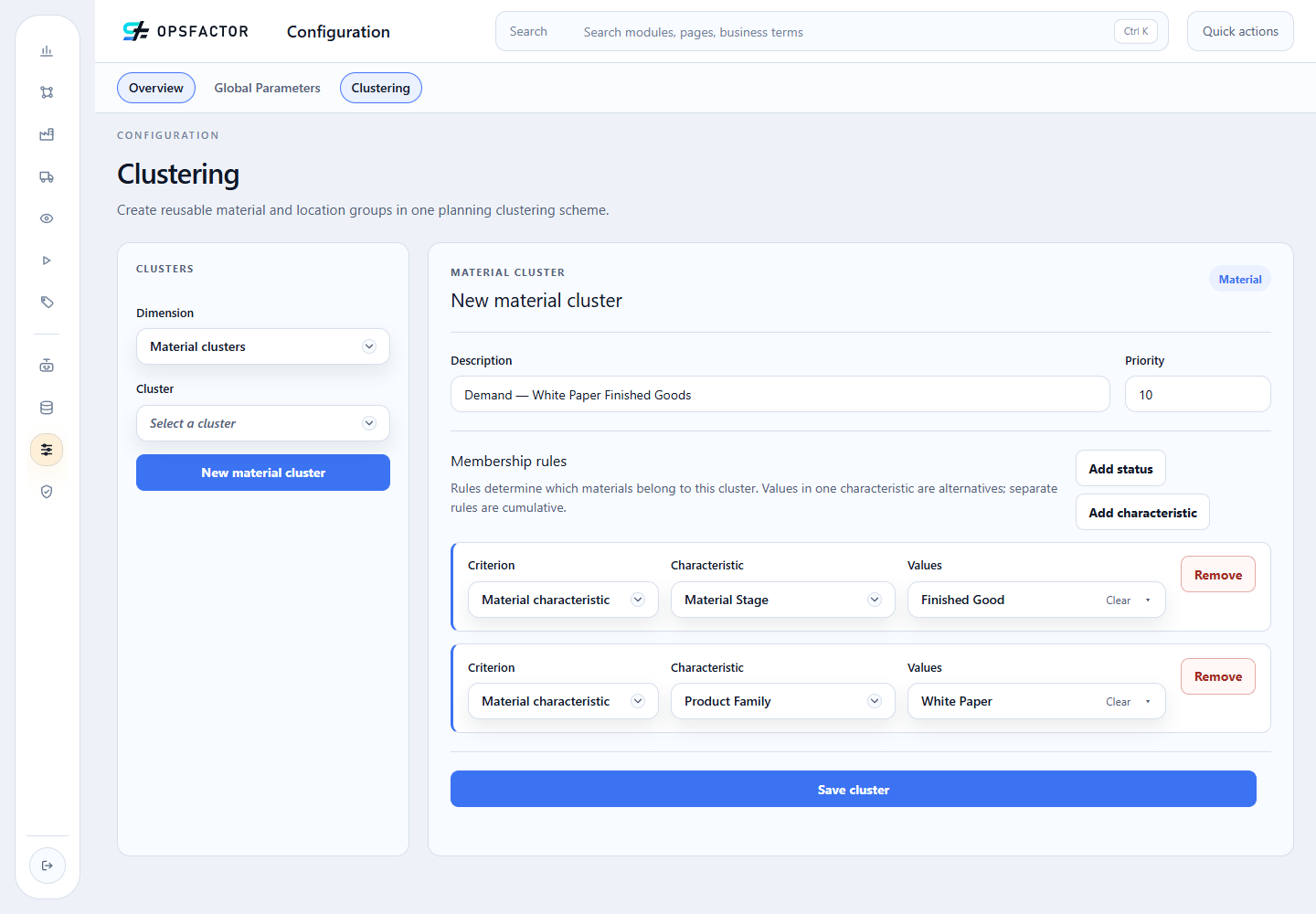
Before saving, check the description, priority, and both rules.
- Choose Save cluster and wait until the server save-and-reload message is visible.
- Under Materials in this cluster, reconcile six finished goods. Rolls and skids must not appear.
Create the tissue cluster
- Still under Material clusters, choose New material cluster.
- Enter
Demand — Tissue Paper Finished Goodsand priority20. - Add
Material Stage = Finished Good. - Add
Product Family = Tissue Paper. - Save and reconcile two members:
FG_TISSUE_DOUBLE_12andFG_TISSUE_TRIPLE_12.
Create the customer cluster
- Under Dimension, select Location clusters.
- Choose New location cluster.
- Enter
Demand — All Customer Regionsand priority10. - Choose Add location rule.
- Select Criterion = Location Type and Location type = End Client.
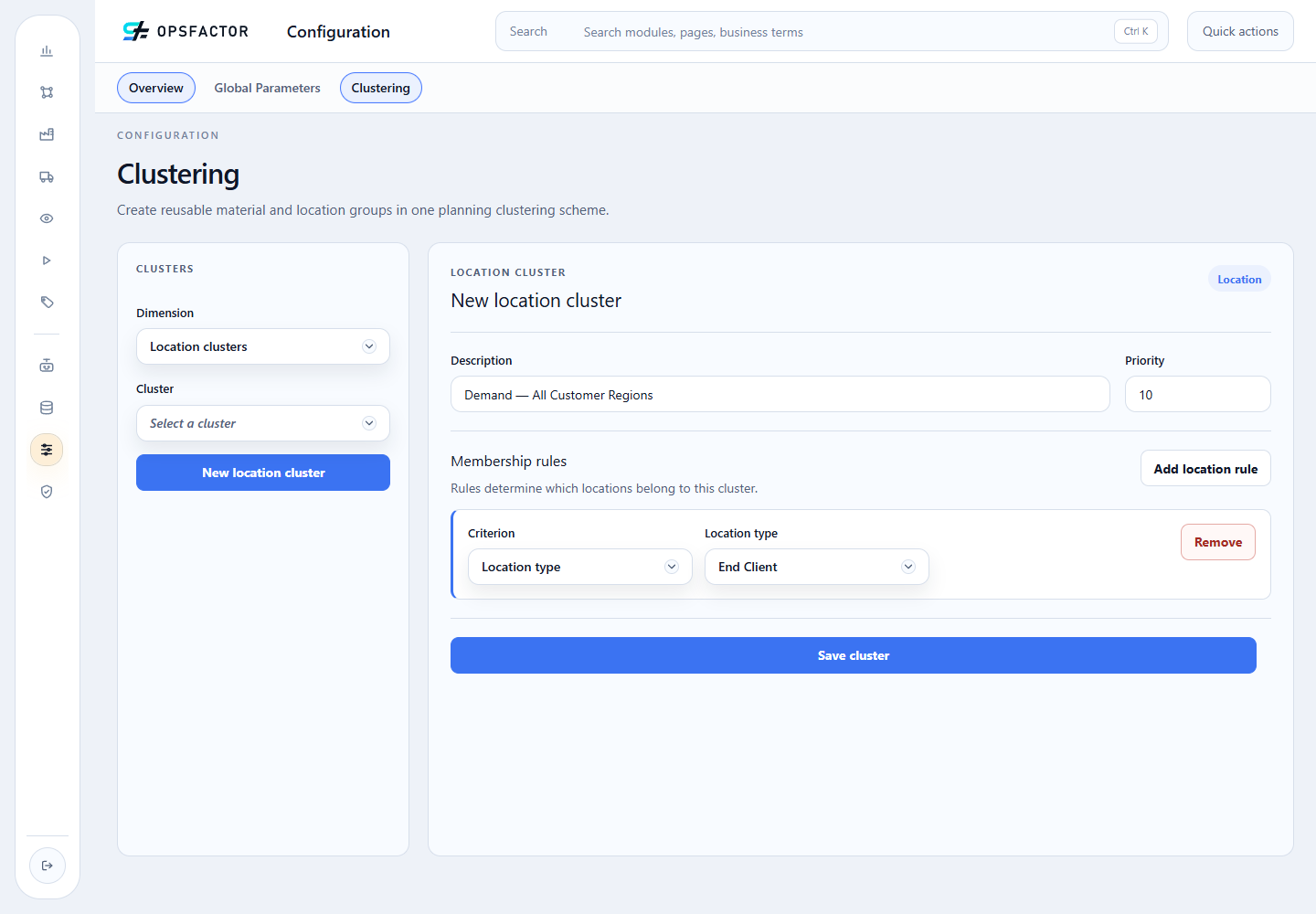
The Dimension = Location clusters selector changes the editor type. The screenshot shows the populated state immediately before persistence.
- Choose Save cluster.
- Choose Load members and reconcile six region/channel combinations: Central, Coastal, and East, each with Direct and Indirect.
Read the result
If a finished good is missing, check its MATERIAL_STAGE and
PRODUCT_FAMILY assignments first. If an intermediate appears, a rule is
missing or has the wrong value. For locations, confirm that all six records are
active and classified as End Client.
Do not weaken the rule just to force the expected count. The rule expresses a business decision; discrepancies must be corrected in master data or explained.
Checkpoint
- 2 functional material clusters with 6 and 2 members;
- 1 location cluster with 6 members;
- no statistical configuration or Demand Plan created;
- rules and members reloaded from the server, not only displayed in a draft.
The next lesson creates a monthly profile and configures Holt-Winters for each finished-goods cluster. Return to the course map or continue to manual statistical configuration.