Demand Planning cluster-level configuration
Cluster-level configuration defines how forecast is calculated for one material-cluster and location-cluster combination within an execution profile.
It is different from cluster registration, which defines which materials and locations belong to each group.
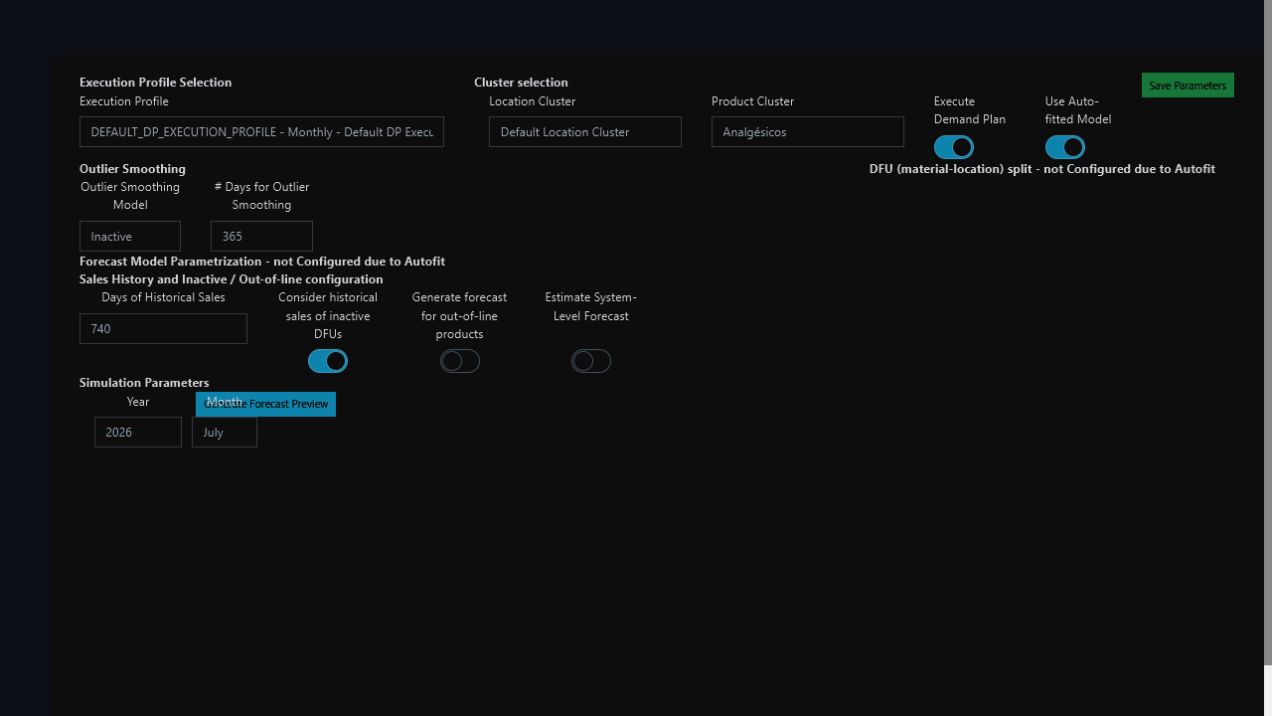
Dark-theme demo: select the profile and cluster pair before reviewing forecast parameters or generating a preview.
Path in the platform
Demand Planning > Configuration > Cluster-Level Configuration
Grain and key
One configuration is identified by:
demandPlanExecutionProfileId × materialClusterId × locationClusterId
Changing the parameters changes future simulations and runs for that combination. It does not rewrite Demand Plans already generated.
Required fields
| Field | Meaning |
|---|---|
demandPlanExecutionProfileId |
Execution profile owning the configuration |
materialClusterId |
Material cluster receiving these parameters |
locationClusterId |
Location cluster receiving these parameters |
demandPlanningGeneralParameters |
General-parameter block |
demandPlanningForecastParameters |
Forecast-parameter block |
statisticalModel |
Statistical model selected explicitly |
splitModel |
Split model selected explicitly |
Optional general parameters
| Field | Meaning | Default Value When Not Provided |
|---|---|---|
executeDemandPlan |
Whether this cluster pair participates in Demand Planning | true |
uomId |
Unit used to calculate and present the forecast | Demand Planning unit resolved from profile/global parameters |
roundToSalesUnit |
Whether forecast is rounded to the material's sales unit | false |
considerHistoricalSalesOfInactiveDfus |
Whether inactive DFUs remain eligible for model history | true |
generateForecastForDiscontinuedMaterials |
Whether discontinued materials may still receive forecast | Effective value in Global Planning Parameters |
materialAggregationType |
How the material dimension is calculated | Top-Down |
locationAggregationType |
How the location dimension is calculated | Top-Down |
daysSalesHistory |
Historical window available to the statistical model | Statistical-history window in Global Planning Parameters |
Optional forecast parameters
| Field | Meaning | Default Value When Not Provided |
|---|---|---|
daysMovingAverageModel |
Historical window used by Moving Average models | 120 days |
daysTopDownSplit |
Historical window used by the Historical Sales split |
120 days |
alpha |
Level smoothing for Exponential Smoothing or Holt-Winters | Automatic selection |
beta |
Trend smoothing for Holt-Winters | Automatic selection |
gamma |
Seasonal smoothing for Holt-Winters | Automatic selection |
Availability by edition
| Capability | Community | Enterprise |
|---|---|---|
| Configuration by profile and material/location cluster pair | Available | Available |
| Top-down or bottom-up by dimension | Available | Available |
| Community statistical-model catalog | Available | Available |
| Split by historical sales | Available | Available |
| Use the profile's approved AutoFit model | Unavailable | Available |
| Additional statistical and foundation models | Unavailable | Available |
| Forecast-proportion or hierarchical split | Unavailable | Available |
| Stockout treatment, history cleansing, and event uplift | Unavailable | Available |
| Budget as Forecast and internal regressors | Unavailable | Available |
See the exact model availability in Statistical Model and Split Model.
How to configure
- Select the execution profile.
- Select one location cluster and one material cluster.
- Enable or disable execution for that pair.
- Choose top-down or bottom-up independently for material and location.
- Select the statistical model and review its visible parameters.
- If either dimension is top-down, select the split model and its reference window.
- Confirm the unit, history, inactive/discontinued treatment, and rounding.
- Save the configuration.
- Generate a forecast preview and inspect series, bias, error, and split before the official run.
What is configured elsewhere
| Decision | Correct configuration |
|---|---|
| Which records belong to each cluster | Forecast clusters |
| Source, bucket, plan horizon, and edit window | Execution profile |
| Generation and comparison of AutoFit candidates | Cluster-level AutoFit |
| Collaboration stages and editable key figures | Demand Planning workflow |
Dependencies
- a valid execution profile;
- material and location clusters with complete allocation;
- sales history and an eligible historical window;
- units of measure;
- a split rule whenever at least one dimension is top-down;
- an approved Enterprise AutoFit model before enabling profile AutoFit.
Used by
- forecast preview and parameter simulation;
- official Demand Planning execution;
- statistical baseline generation and split to DFUs;
- Enterprise AutoFit winner resolution;
- Demand Plan analysis and collaboration.
Validations
- profile, material cluster, and location cluster are present;
- general and forecast parameter blocks are present;
- statistical model and split model are selected explicitly;
- historical windows are positive when filled;
- selected model and split are available in the current edition;
Historical Salessplit has a positive reference window;- an Enterprise model is compatible with its split and advanced parameters;
- unit and all referenced objects exist.