6. Configure optimization and brownfield profiles
What you will build
Define engine, regional scope, optional facilities, and capacity constraints.
Before starting
Use fully connected networks with costs, demand, and current/candidate facilities identified. Define the horizon and the comparison each profile must answer.
The profile stores the calendar, engine, rules, and location scope. The execution combines that profile with a network version, a Demand Plan, and a reference date. Record this combination to reproduce the study.
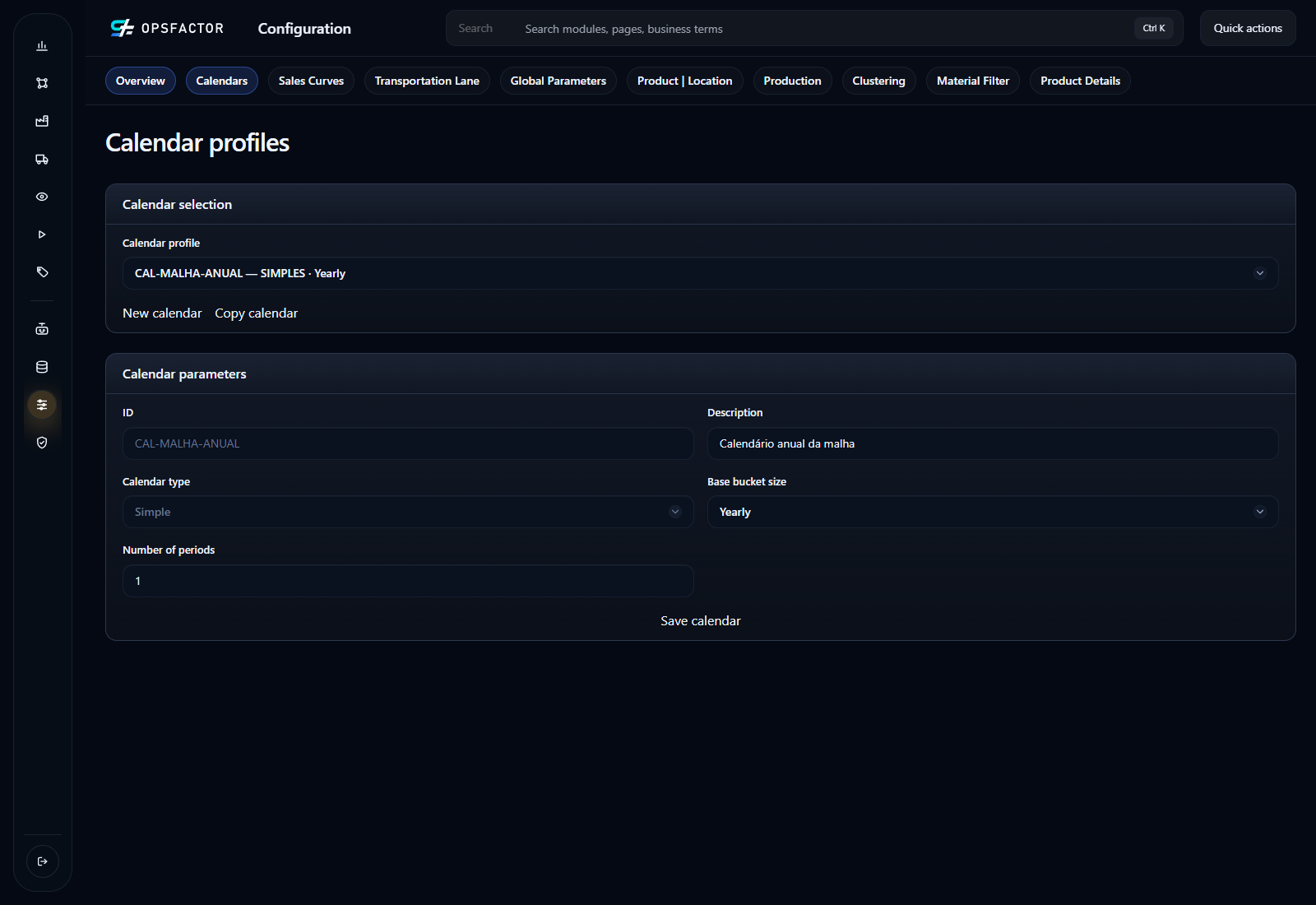
In Configuration > Calendars, create CAL-MALHA-ANUAL with Calendar type = Simple, Base bucket
size = Yearly and Number of periods = 1. Save it and select it in
Calendar profile for each profile used in this study. This matches the
annual 2026 demand; the plan start is selected when running.
Start with one overall baseline profile, one overall flexible-network profile, and one brownfield profile per macroregion. In regional profiles, explicitly define participating locations and distinguish fixed facilities from those that may be activated or deactivated. Include the origins needed to supply the selected scope and preserve comparable demand.
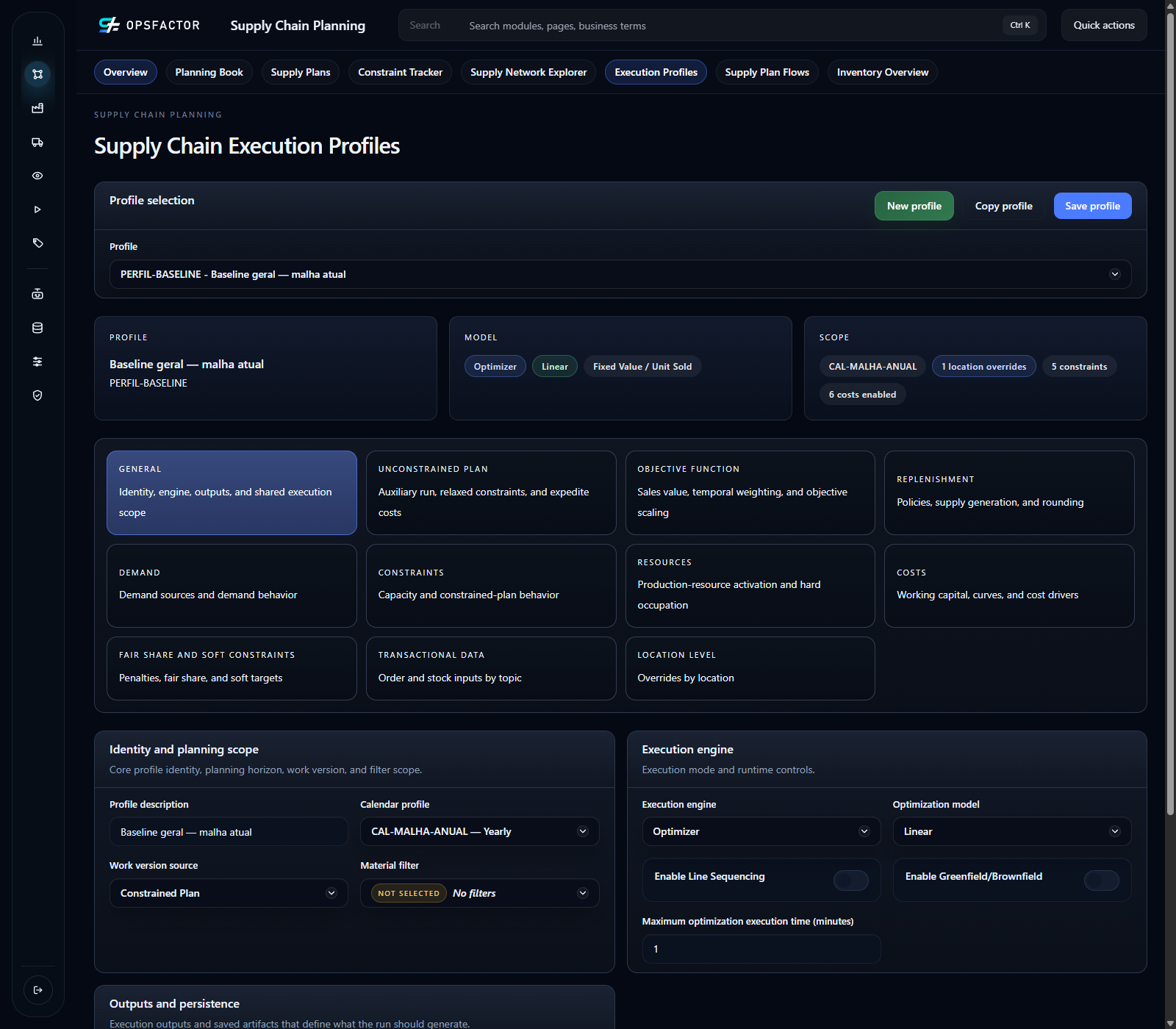
In Supply Chain Planning > Execution Profiles, open PERFIL-BASELINE.
In General, check Calendar profile = CAL-MALHA-ANUAL,
Execution engine = Optimizer, Optimization model = Linear, and
Enable Greenfield/Brownfield disabled. Current facilities remain fixed
in this scenario; select the combination with MALHA-BASELINE when running.
Save the profile and reopen it to check the configuration.
| Decision | Optimizer type in this template | Consideration |
|---|---|---|
| Reallocate volumes among fixed facilities | Linear | Suitable when no discrete decision is needed |
| Round loads or trip counts | Integer/mixed integer | Represent lots, vehicles, and cost per trip |
| Evaluate DC opening in brownfield/greenfield | Combinatorial | Enable candidates and distinguish fixed from optional facilities |
In the evaluation profile, select Execution engine = Optimizer and enable Enable Greenfield/Brownfield. The interface displays Optimization model = CP-SAT, required by this capability. This is the combinatorial model used to decide facility activation. In the location rules, identify candidates, activation cost, and the applicable production, storage, inbound, and outbound constraints.
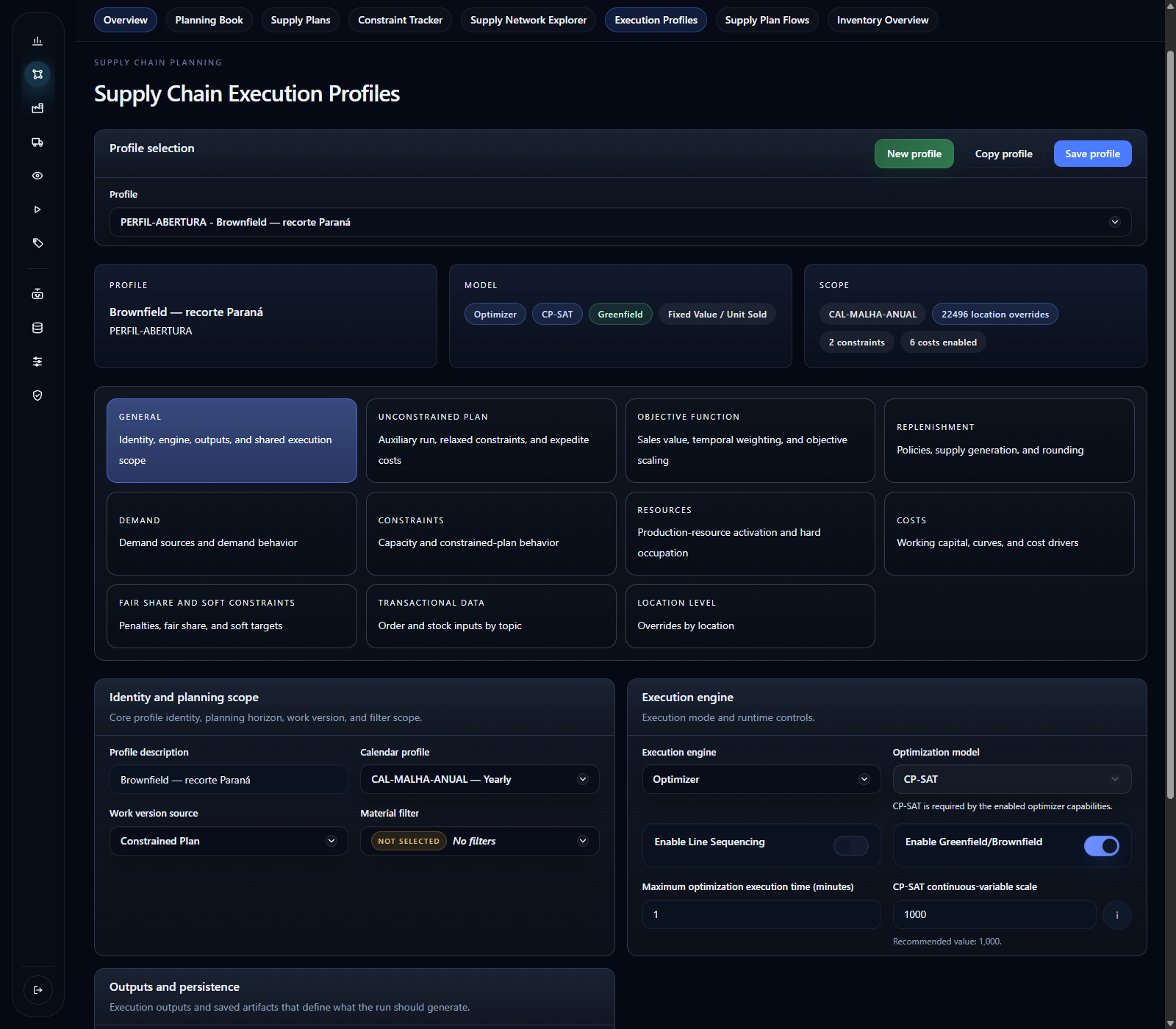
The combinatorial optimizer is the configuration used for this template's facility-opening studies. Selecting it alone does not create candidates, fixed costs, or transportation lanes. Validate the complete facility model.
The profile summary also shows Fixed Value / Unit Sold, associated with the optimization objective. In this scenario, the synthetic weight is 4,000 per fulfilled TON. That value guides the solver's choices; it is not a registered selling price, P&L revenue, or margin. Check the settings in Objective Function and interpret the objective value separately from the reconciled costs in chapter 7. Depending on that value and the costs, the model may prefer not to fulfill part of the demand; check whether this preference represents the study's service objective.
Compare production and logistics capacity enabled in a medium-term scenario with a more flexible capacity assumption in the long term. Disabling capacity represents expansion or the absence of that limitation; it does not establish that the current operation can handle the volume. State this assumption beside the result.
An optional facility can be an existing DC. In this scenario, six current DCs remain fixed in the baseline and flexible current network; the brownfield study makes their continued operation or closure a decision. The new locations proposed in chapter 4 represent opening alternatives. Do not confuse optional activation with a facility's age: distinguish existing/new from fixed/optional.
Define a regional profile
- Create a separate profile for the macroregion and link its calendar. Select the network version and Demand Plan when running it in chapter 7. Keep the overall profile available for a whole-network comparison.
- In the per-location scope configuration, explicitly disable locations outside the study and enable participants. An absent individual setting does not mean that the location is excluded. Include regional demand, current DCs, candidates, and the plants or suppliers needed for supply. An origin may be outside the macroregion and still be necessary for the study.
- Distinguish fixed facilities from those that may be activated or deactivated. Check each candidate's activation rule and cost. A candidate outside the profile scope will not be evaluated merely because it is in the network.
- Enable the combinatorial facility-opening configuration and check production, storage, inbound, and outbound constraints. Keep medium-term capacities in that scenario; use another profile to test a long-term expansion assumption.
- Before running, trace a complete supply path for each candidate, from its origin to eligible demand. Compare scoped demand with the regional control and record the fixed and optional facilities included.
Check the new candidate in the regional profile
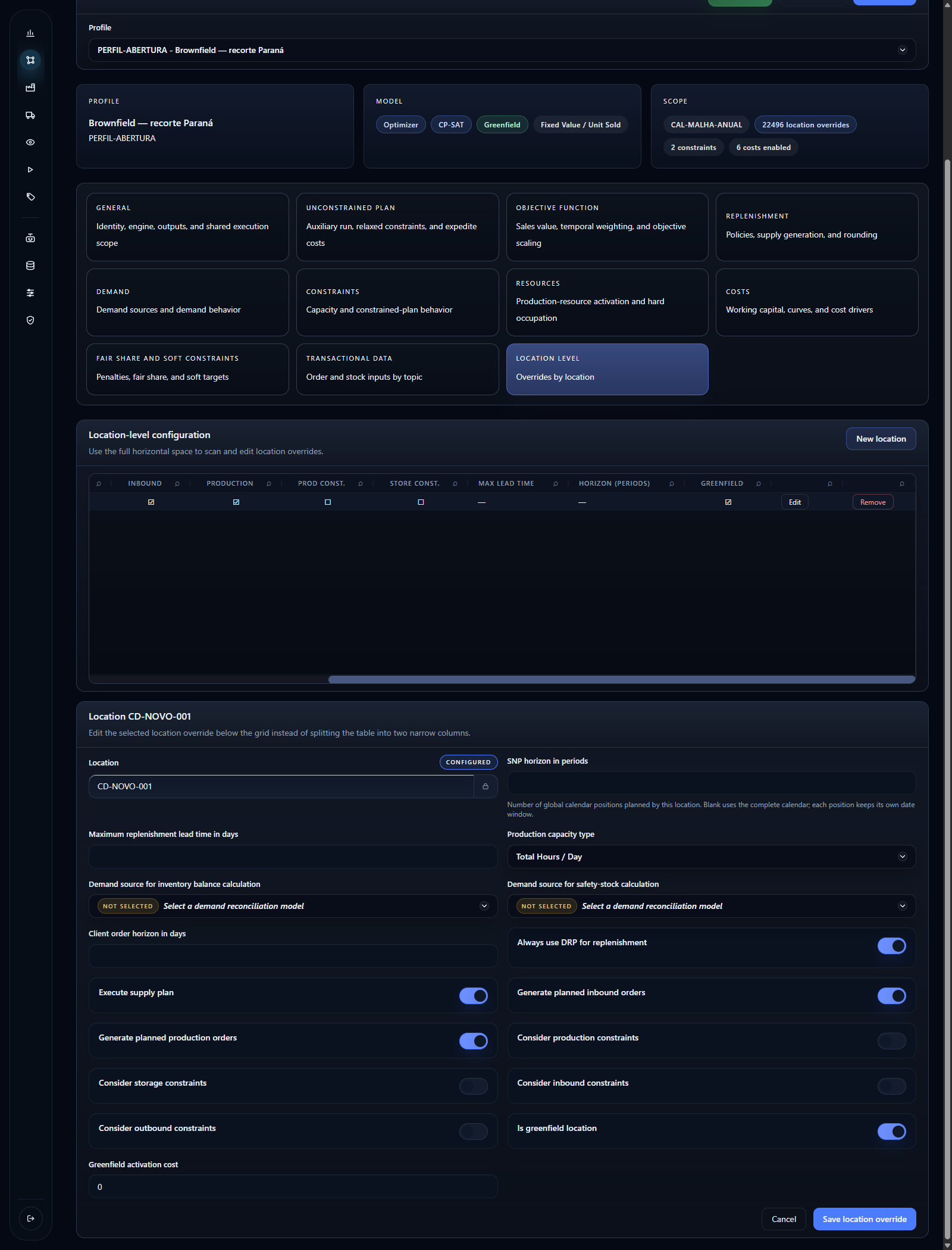
Open PERFIL-ABERTURA, select Location Level, and edit the configuration
for CD-NOVO-001. Check Execute supply plan enabled to include it in scope
and Is greenfield location enabled to let the model decide its activation.
These are different decisions: participating in the study does not mean the
facility must open.
In this example, Greenfield activation cost = 0 represents the assumption without CAPEX. The candidate's four capacity constraints are disabled; this is the flexible-capacity assumption, not a measurement of installed capacity. The annual fixed cost registered in chapter 5 remains part of the model and must be checked for the facility when open. Click Save location override after changing the record and reopen it to verify. The new candidate remains excluded from baseline and flexible profiles.
Interpret regional results within that scope. Do not automatically add gains from independent regional studies if they compete for the same plant or transportation capacity; check the combined solution in a profile covering the relevant network.
Check before continuing
Each profile has a complete calendar, engine, and scope. The network and demand are identified for selection at execution time. Candidates are distinguished from fixed facilities; engine and capacity rules match the scenario’s question.
Previous: 5. Create and connect candidate locations.
Next: 7. Run and compare results.