11. Load production and capacity data
Supply Planning can propose production only when it knows where to produce, which resources to consume, how much time to use, and which components to transform. These relationships are master data: they describe capacity and the production recipe, but they are not a production order.
Use the units, materials, and locations loaded in chapter 2 as prerequisites. Every ID and unit referenced by these seven files must exist before import.
Original file and field glossary
Keep the download identical to the application export: headers, sheet names, column order, types, values and native formatting. The field tables explain the literal technical names outside the workbook. Configured descriptions and IDs are scenario data, not translations applied after download.
How the objects connect
flowchart TB
    ML["Output material + location<br/><small>What to produce and where</small>"] --> PV["Production version<br/><small>Eligible production alternative</small>"]
    PV --> RT["Production routing<br/><small>How to perform the transformation</small>"]
    RT --> OP["Operation<br/><small>Sequence and duration<br/>for the base quantity</small>"]
    OP --> RP["Production resource<br/><small>Line or equipment consumed</small>"]
    RP --> AM["Availability<br/><small>Capacity hours by date</small>"]
    PV --> BOM["Bill of materials / recipe<br/><small>What production consumes</small>"]
    BOM --> CP["Components<br/><small>Input materials and quantities</small>"]
Each box represents a master-data concept. The production version links the routing and bill of materials for a material and plant. Operations consume resource time; components consume material quantities.
The scenario's production flow
flowchart TB
    RM["Pulp<br/><small>Raw material<br/>purchased from a supplier</small>"] --> R["Paper roll<br/><small>Semi-finished material<br/>produced from pulp</small>"]
    R --> S["Paper skid<br/><small>Intermediate<br/>semi-finished material</small>"]
    S --> FG["Finished paper<br/><small>Finished good<br/>intended for sale</small>"]
This second view follows the scenario materials, from input to saleable product. Rolls and skids are intermediate stages, with their own materials, bills of materials, routings, and production versions. Product family and format identify the specific products at each stage in the workbooks.
Purchasing and transfers between locations are covered in the supply network.
Load order and prerequisites
| Order | File | Dataset | Depends on |
|---|---|---|---|
| 1 | 01-production-resources.xlsx |
Production resources | locations |
| 2 | 02-production-resource-availability.xlsx |
Monthly availability | production resources |
| 3 | 03-production-routing.xlsx |
Production routing | output material, location, and UOM |
| 4 | 04-production-routing-operations.xlsx |
Routing operations | routing and production resources |
| 5 | 05-bill-of-materials.xlsx |
Bill of materials | output material, location, and UOM |
| 6 | 06-bill-of-materials-components.xlsx |
Components | bill of materials, input materials, and UOM |
| 7 | 07-production-version.xlsx |
Production version | routing and bill of materials |
The routing and bill of materials are independent branches. Import the production version only after both branches exist.
Set the Supply Planning standard unit
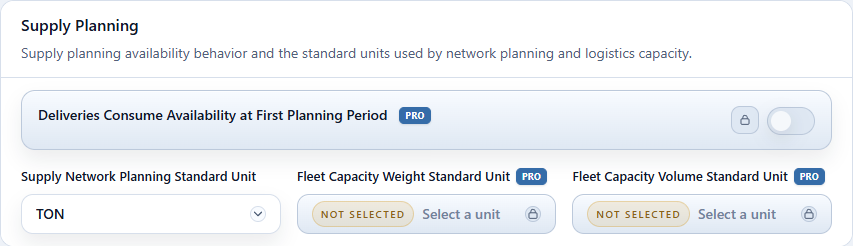
The Supply Planning standard unit is used to compare volumes in the common-unit columns of the Production Plan. For this tutorial, use TON, the unit of the production datasets.
- Open Configuration > Global Parameters. In Supply Planning, select TON for Supply Network Planning Standard Unit. Do not change Demand Planning Standard Unit.
- Return to the top of the page and click Save Parameters to persist the setting.

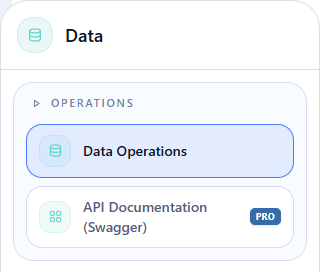
Open Data Operations
Hover over Data, then click Operations > Data Operations in the flyout.
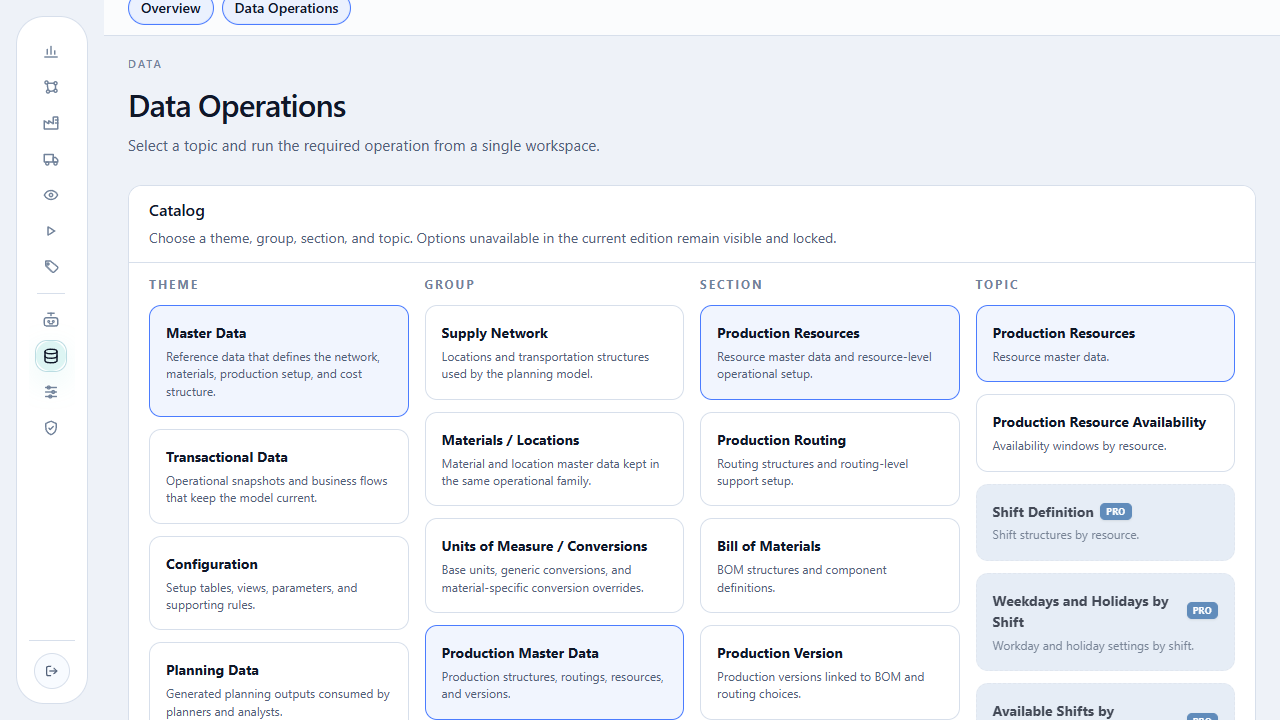
On the open page, read the catalog from left to right: Theme > Group > Section > Topic. For production, start with Master Data > Production Master Data.
Use the same two operational states for each topic, without combining them:
- select Download and click Download as XLSX;
- open and check the downloaded file;
- return to the same topic, select Import, click the import button, and choose the populated file;
- read the platform response before continuing.
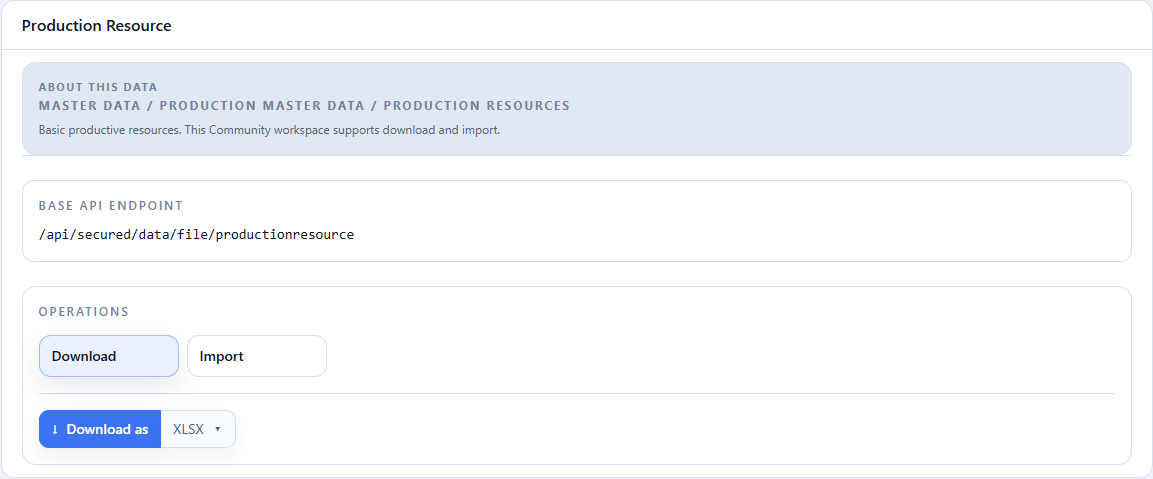
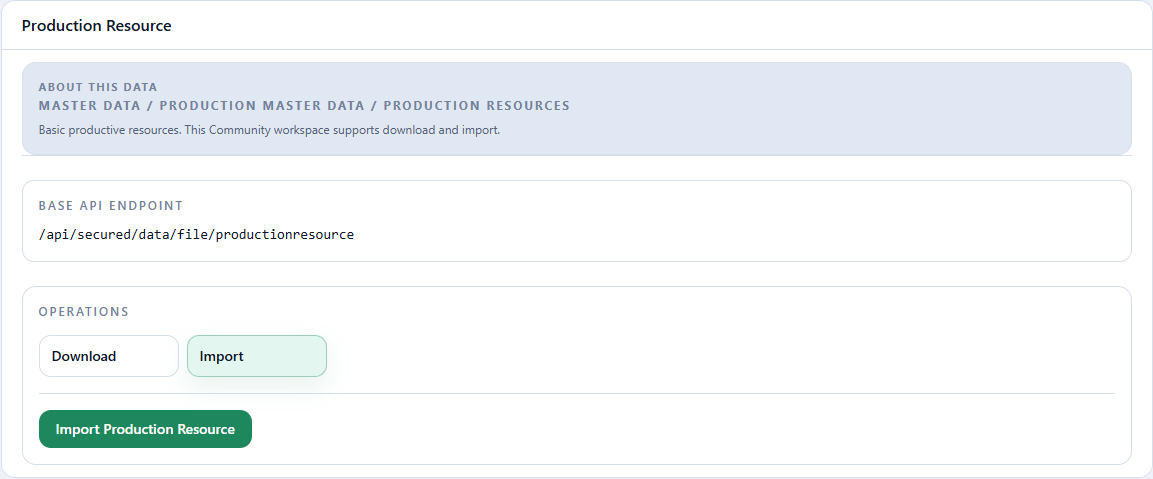
The two images use Production Resources to locate the controls. In the steps below, the topic changes while Download, Import, and the response area remain in the same workspace.
1. Register production resources
Action required
Download the template, open the workbook, and import all ten resources: five at each plant.
Master Data > Production Master Data > Production Resources > Production Resources.
Select Import, click Import Production Resource, and choose
01-production-resources.xlsx. Import starts after file selection.
Read-only excerpt of the original export: sheet Data, 10 data rows; first 5 shown below. Headers and values are preserved. This webpage table does not alter the XLSX.
| Production Resource Id | Description | Location Id | Efficiency (1.0 if empty) | Active (true/false or 1/0) |
|---|---|---|---|---|
| REC_BOBINA_BRANCO_LESTE | Máquina de papel branco — Fábrica Leste | FABRICA_LESTE | 1 | TRUE |
| REC_BOBINA_SANITARIO_LESTE | Máquina de papel tissue — Fábrica Leste | FABRICA_LESTE | 1 | TRUE |
| REC_CONVERSAO_BRANCO_LESTE | Linha de conversão de papel branco — Fábrica Leste | FABRICA_LESTE | 1 | TRUE |
| REC_CONVERSAO_SANITARIO_LESTE | Linha de conversão de papel tissue — Fábrica Leste | FABRICA_LESTE | 1 | TRUE |
| REC_PILHA_LESTE | Linha de preparação de pilhas — Fábrica Leste | FABRICA_LESTE | 1 | TRUE |
| Field | Meaning | Tutorial value |
|---|---|---|
Production Resource Id |
Unique resource code referenced by routing operations. | roll, converting, and skid resources |
Description |
Recognizable resource name. | white-paper, tissue, or skid line |
Location Id |
Plant where the resource is available. | FABRICA_LESTE or FABRICA_SUL |
Efficiency (1.0 if empty) |
Factor applied to nominal capacity; 1 preserves the stated capacity. |
1 |
Active (true/false or 1/0) |
Determines whether planning can use the resource. | true |
Checkpoint: the Import response must not contain ID or location errors. A new Download should return all ten resource codes, five per plant.
2. Load monthly availability
02-production-resource-availability.xlsx
Action required
Download the template and import its 120 rows only after all ten resources exist.
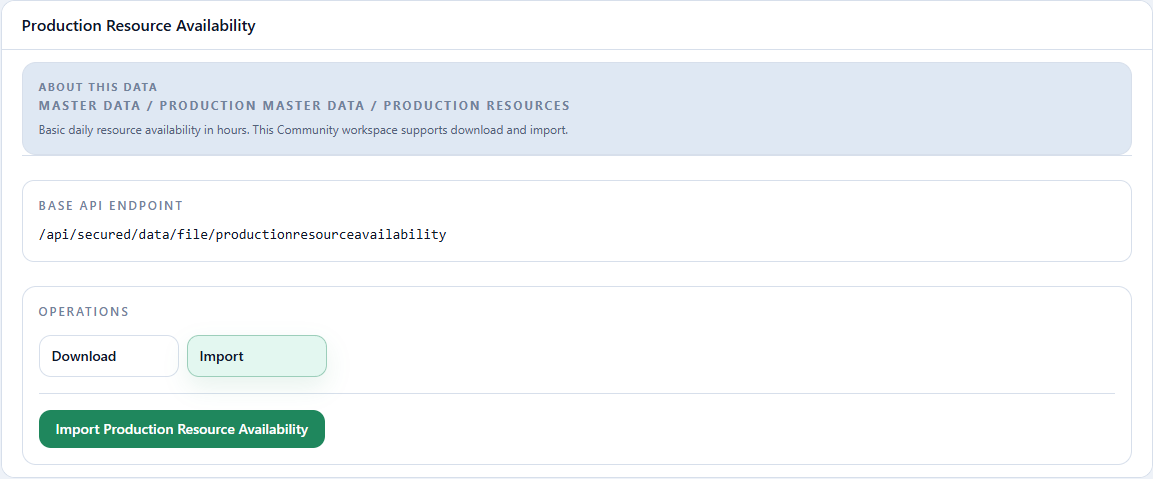
Master Data > Production Master Data > Production Resources > Production Resource Availability.
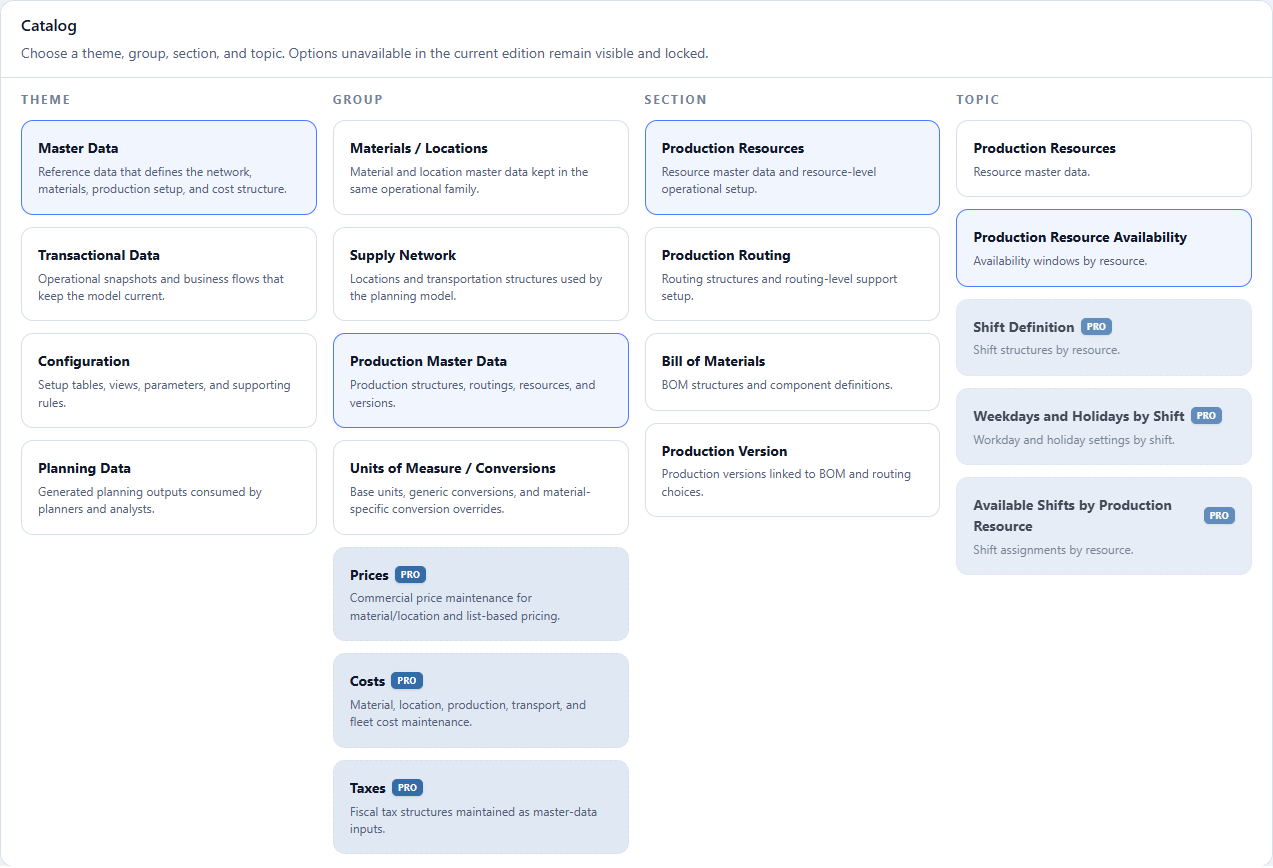
The catalog screen above shows Production Resource Availability under Production Resources in the Topic column.
Select Import, click Import Production Resource Availability, and
choose 02-production-resource-availability.xlsx. Import starts after
file selection; check the response before continuing.
Read-only excerpt of the original export: sheet Data, 120 data rows; first 5 shown below. Headers and values are preserved. This webpage table does not alter the XLSX.
| Production Resource Id | Reference Date | Available Hours |
|---|---|---|
| REC_BOBINA_BRANCO_LESTE | 2027-01-01T00:00:00 | 280 |
| REC_BOBINA_BRANCO_LESTE | 2027-02-01T00:00:00 | 280 |
| REC_BOBINA_BRANCO_LESTE | 2027-03-01T00:00:00 | 280 |
| REC_BOBINA_BRANCO_LESTE | 2027-04-01T00:00:00 | 280 |
| REC_BOBINA_BRANCO_LESTE | 2027-05-01T00:00:00 | 280 |
| Field | Meaning | Tutorial value |
|---|---|---|
Production Resource Id |
Resource whose capacity is being stated. | roll, converting, or skid resource |
Reference Date |
Date on which the available hours are registered. | first day of each month in 2027 |
Available Hours |
Resource capacity available in that month. | varies by resource and plant |
The published contract is daily: a date without a row contributes zero capacity. Because this tutorial executes in monthly buckets, the file consolidates each month's hours on its first day. It therefore contains one row per resource per month: 12 months for each of ten resources, or 120 rows in 2027.
Checkpoint: check all 120 rows and sample dates to verify that each resource has one row for every month in 2027.
3. Create the production routing
Action required
Download the template and import the 34 routings that cover rolls, skids,
and finished goods at FABRICA_LESTE and FABRICA_SUL.
Master Data > Production Master Data > Production Routing > Production Routing.
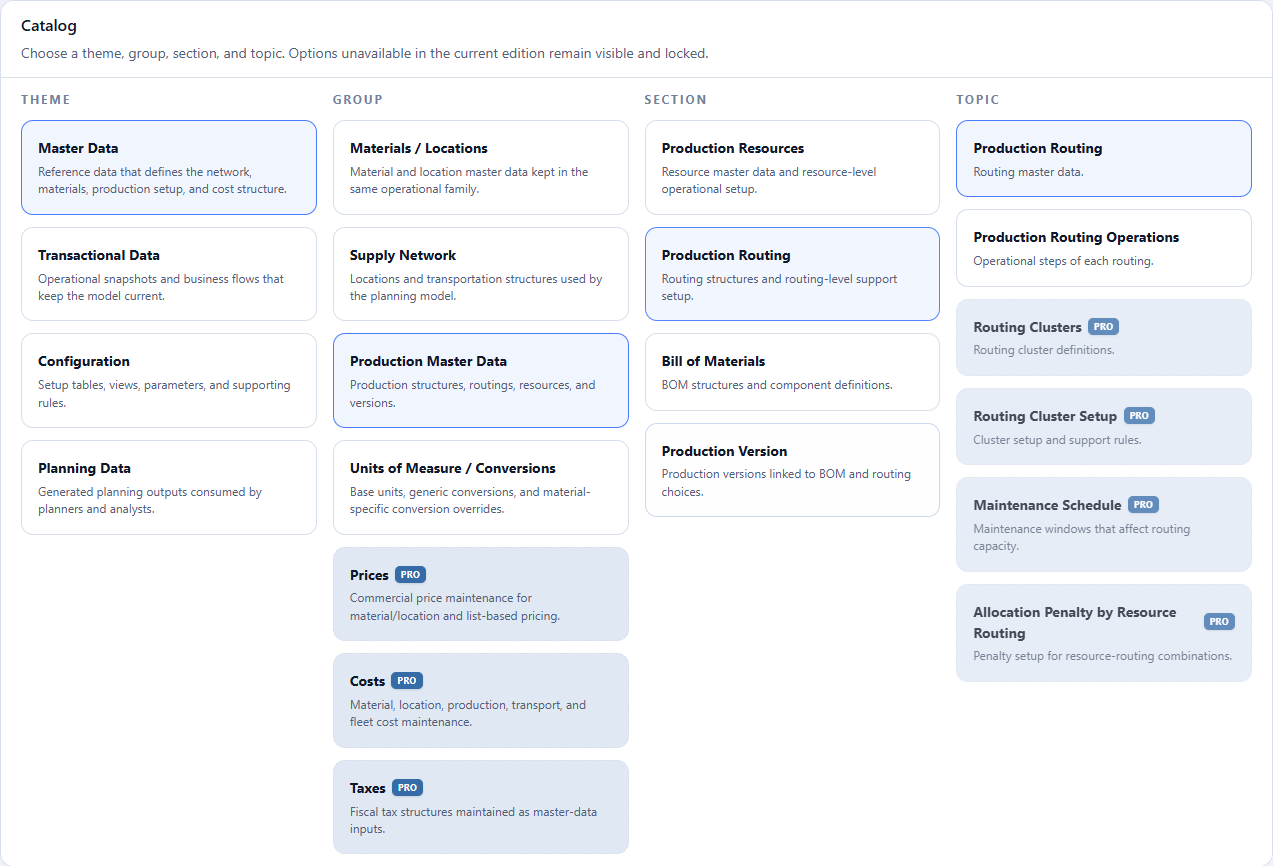
- Theme: select Master Data.
- Group: select Production Master Data.
- Section: select Production Routing.
- Topic: select Production Routing.
- Check Production Routing in the panel title to confirm the topic.
- Select the Import operation.
- Click Import Production Routing and choose
03-production-routing.xlsx. Import starts after file selection; check the response before continuing.
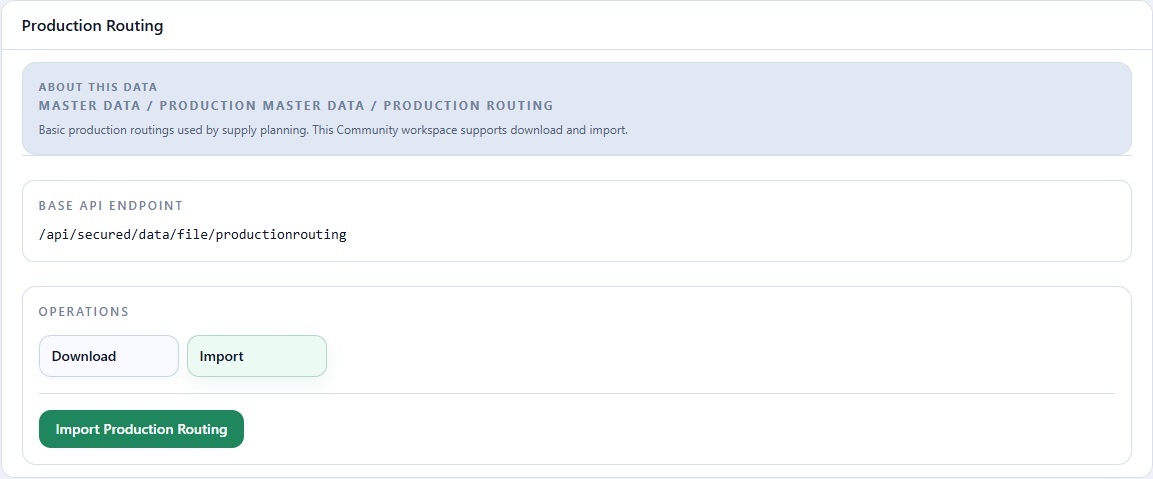
Read-only excerpt of the original export: sheet Data, 34 data rows; first 5 shown below. Headers and values are preserved. This webpage table does not alter the XLSX.
| Routing Id | Description | Location Id | Output Material Id | Base Quantity | Base Quantity UOM | Routing can be used without production version | Priority | Active (true/false or 1/0) |
|---|---|---|---|---|---|---|---|---|
| ROTEIRO_FABRICA_LESTE_BOBINA_BRANCO_75 | Fábrica Leste — Bobina de papel branco 75 g/m² | FABRICA_LESTE | BOBINA_BRANCO_75 | 10 | TON | FALSE | 1 | TRUE |
| ROTEIRO_FABRICA_LESTE_BOBINA_BRANCO_90 | Fábrica Leste — Bobina de papel branco 90 g/m² | FABRICA_LESTE | BOBINA_BRANCO_90 | 10 | TON | FALSE | 1 | TRUE |
| ROTEIRO_FABRICA_LESTE_BOBINA_SANITARIO | Fábrica Leste — Bobina de papel tissue | FABRICA_LESTE | BOBINA_SANITARIO | 10 | TON | FALSE | 1 | TRUE |
| ROTEIRO_FABRICA_LESTE_PA_BRANCO_75_A4_100 | Fábrica Leste — Papel branco A4 75 g/m² — 100 folhas | FABRICA_LESTE | PA_BRANCO_75_A4_100 | 8 | TON | FALSE | 1 | TRUE |
| ROTEIRO_FABRICA_LESTE_PA_BRANCO_75_A4_50 | Fábrica Leste — Papel branco A4 75 g/m² — 50 folhas | FABRICA_LESTE | PA_BRANCO_75_A4_50 | 8 | TON | FALSE | 1 | TRUE |
Scroll horizontally to check every column.
| Field | Meaning | Tutorial value |
|---|---|---|
Routing Id |
Routing code referenced by operations and the production version. | ROTEIRO_FABRICA_LESTE_PA_COPIA_A4 |
Description |
Name of the production process. | East mill — Copy paper A4 finished product |
Location Id |
Plant where the routing runs. | FABRICA_LESTE |
Output Material Id |
Material produced by the routing. | PA_COPIA_A4 |
Base Quantity |
Output quantity used as the basis for operation durations. | 8 |
Base Quantity UOM |
Unit of the base quantity. | TON |
Routing can be used without production version |
Allows the routing without a version linking it to a BOM. | false |
Priority |
Preference order; a lower number means higher priority. | 1 |
Active (true/false or 1/0) |
Determines whether planning can use the routing. | true |
Checkpoint: the topic Download should return the routing with the same output material and location.
4. Create routing operations
04-production-routing-operations.xlsx
Action required
Import all 34 operations. Reconcile routing, sequence, resource, duration, and time unit.
Master Data > Production Master Data > Production Routing > Production Routing Operations.
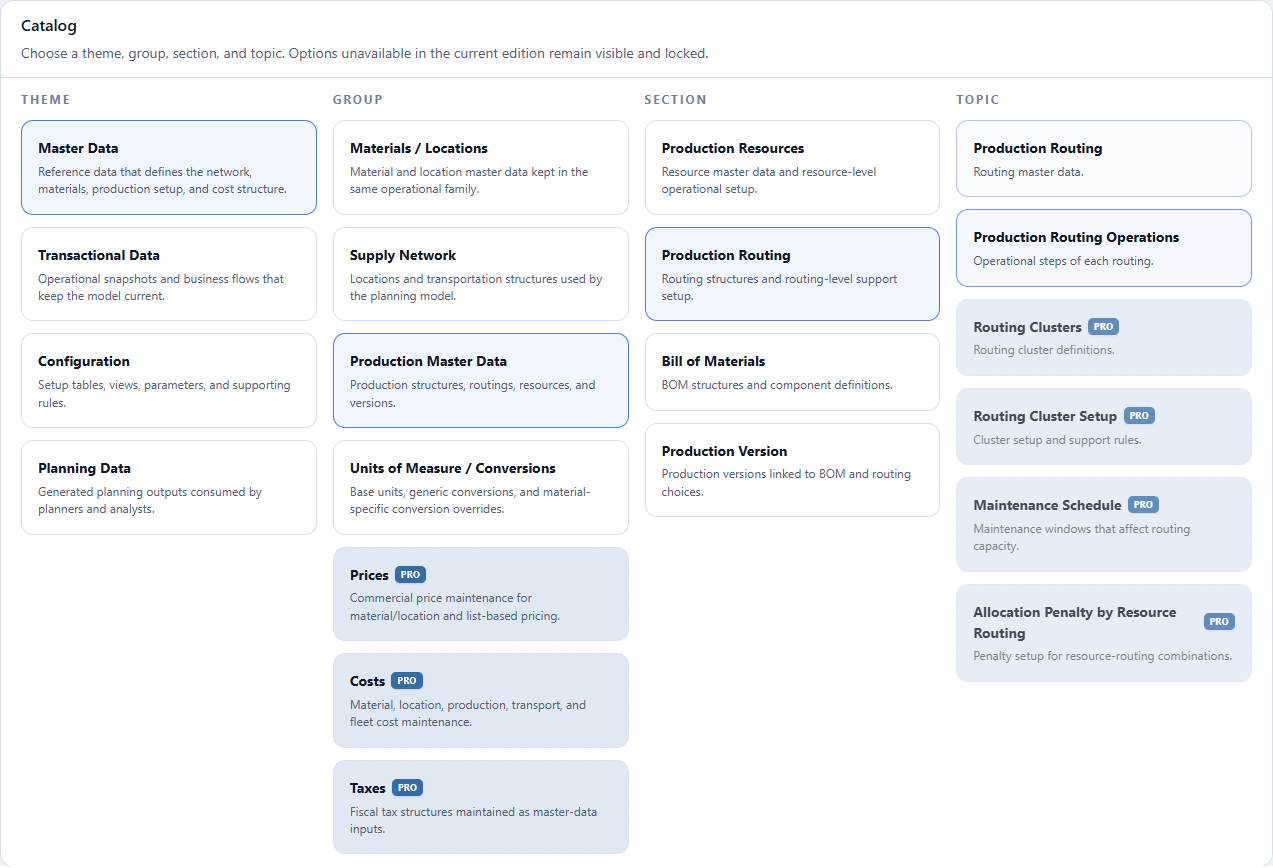
- Theme: select Master Data.
- Group: select Production Master Data.
- Section: select Production Routing.
- Topic: select Production Routing Operations.
- Check Routing Operation in the panel title to confirm the topic.
- Select the Import operation.
- Click Import Routing Operation and choose
04-production-routing-operations.xlsx. Import starts after file selection; check the response before continuing.
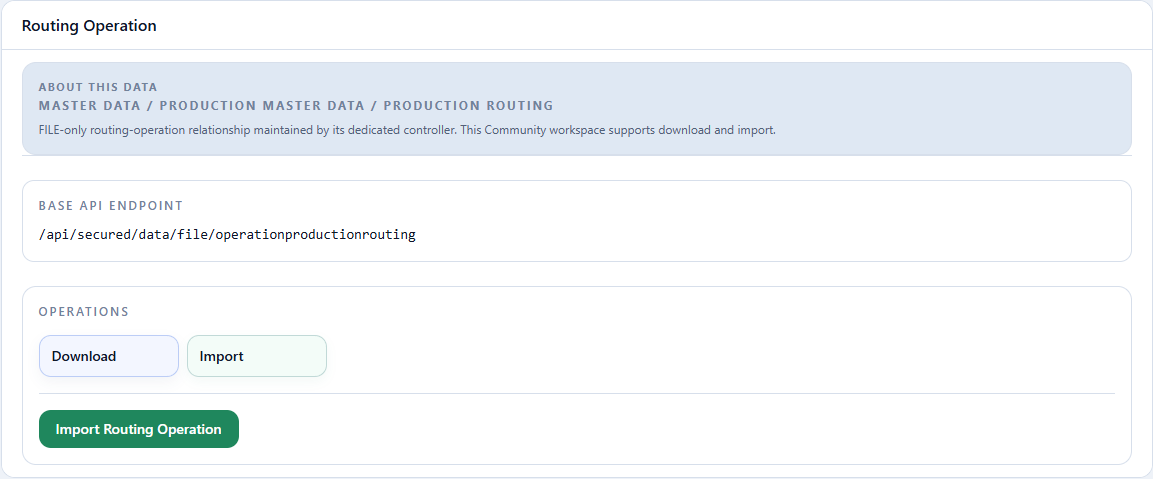
Read-only excerpt of the original export: sheet Data, 34 data rows; first 5 shown below. Headers and values are preserved. This webpage table does not alter the XLSX.
| Routing Id | Operation Sequence (Integer number) | Production Resource Id | Operation Duration | Time Unit (S, M, H or D; default H) |
|---|---|---|---|---|
| ROTEIRO_FABRICA_LESTE_BOBINA_BRANCO_75 | 1 | REC_BOBINA_BRANCO_LESTE | 2.4 | H |
| ROTEIRO_FABRICA_LESTE_BOBINA_BRANCO_90 | 1 | REC_BOBINA_BRANCO_LESTE | 2.4 | H |
| ROTEIRO_FABRICA_LESTE_BOBINA_SANITARIO | 1 | REC_BOBINA_SANITARIO_LESTE | 4 | H |
| ROTEIRO_FABRICA_LESTE_PA_BRANCO_75_A4_100 | 1 | REC_CONVERSAO_BRANCO_LESTE | 2 | H |
| ROTEIRO_FABRICA_LESTE_PA_BRANCO_75_A4_50 | 1 | REC_CONVERSAO_BRANCO_LESTE | 2 | H |
Scroll horizontally to check every column.
| Field | Meaning | Tutorial value |
|---|---|---|
Routing Id |
Routing to which the operation belongs. | ROTEIRO_FABRICA_LESTE_PA_COPIA_A4 |
Operation Sequence (Integer number) |
Integer order within the routing. | 1 |
Production Resource Id |
Resource consumed by the operation. | REC_CONVERSAO_BRANCO_LESTE |
Operation Duration |
Time the resource takes to process the routing base quantity. | 2 in East; 4 in South |
Time Unit (S, M, H or D; default H) |
Unit of the duration. | H |
Each routing in this scenario has one operation that points to one
resource. The routing defines the 8 TON base output; the operation states
the hours required for that base. The engine scales this relationship to
constrain the resource; this is not detailed order sequencing.
Checkpoint: the topic should return 34 operations, each referencing an existing routing and resource.
5. Create the bill of materials
Action required
Import all 34 bill-of-materials headers before importing their components.
Master Data > Production Master Data > Bill of Materials > Bill of Materials.
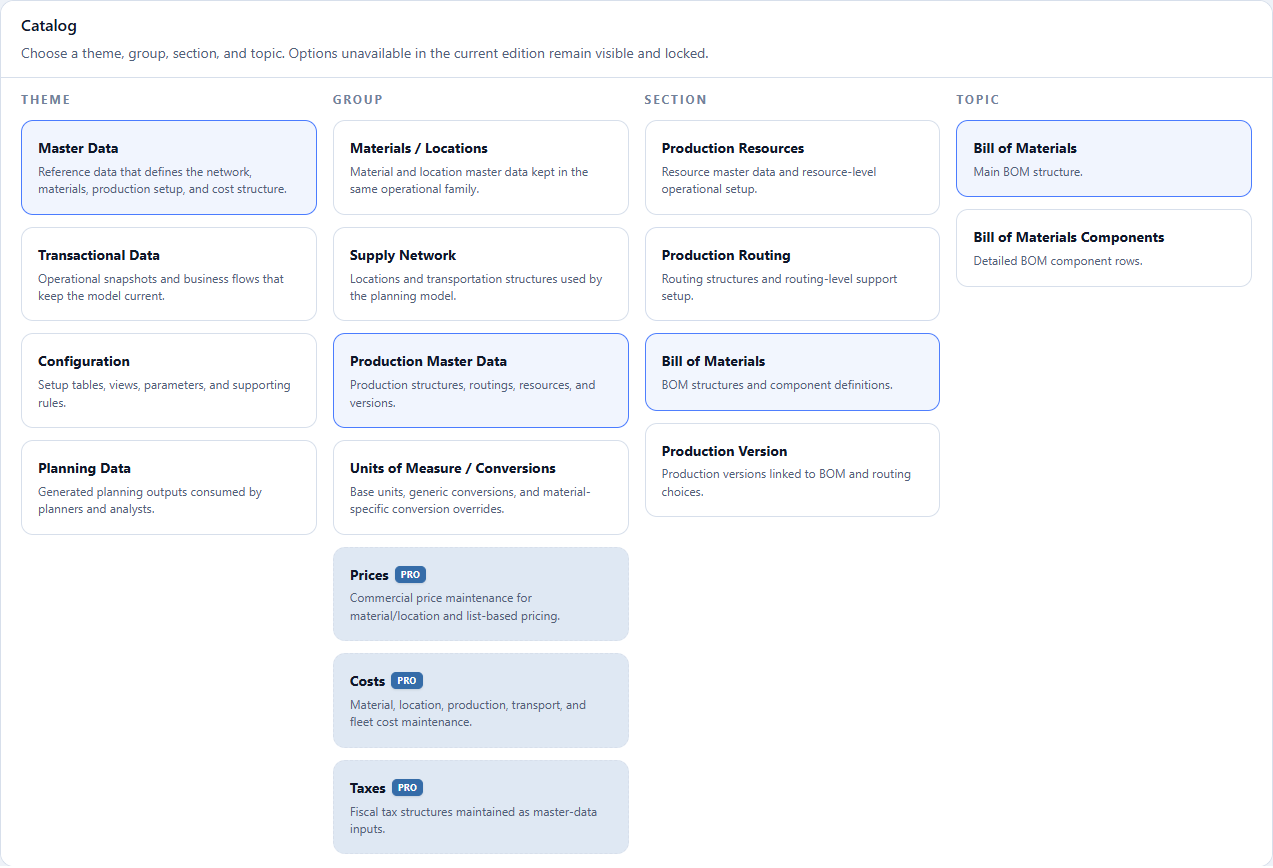
- Theme: select Master Data.
- Group: select Production Master Data.
- Section: select Bill of Materials.
- Topic: select Bill of Materials.
- Check Bill of Materials in the panel title to confirm the topic.
- Select the Import operation.
- Click Import Bill of Materials and choose
05-bill-of-materials.xlsx. Import starts after file selection; check the response before continuing.
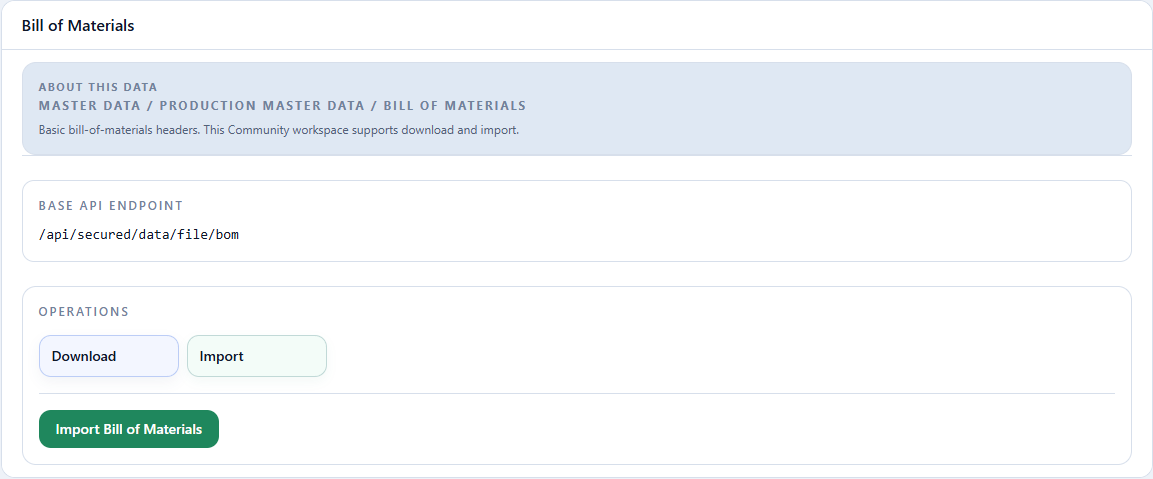
Read-only excerpt of the original export: sheet Data, 34 data rows; first 5 shown below. Headers and values are preserved. This webpage table does not alter the XLSX.
| Bill of Materials Id | Description | Location Id | Output Material Id | Output Quantity | Output Unit of Measure Id | Priority | Active (true/false or 1/0) | Bill of Materials can be used without production version |
|---|---|---|---|---|---|---|---|---|
| LT_FABRICA_LESTE_BOBINA_BRANCO_75 | Fábrica Leste — Bobina de papel branco 75 g/m² | FABRICA_LESTE | BOBINA_BRANCO_75 | 1 | TON | 1 | TRUE | FALSE |
| LT_FABRICA_LESTE_BOBINA_BRANCO_90 | Fábrica Leste — Bobina de papel branco 90 g/m² | FABRICA_LESTE | BOBINA_BRANCO_90 | 1 | TON | 1 | TRUE | FALSE |
| LT_FABRICA_LESTE_BOBINA_SANITARIO | Fábrica Leste — Bobina de papel tissue | FABRICA_LESTE | BOBINA_SANITARIO | 1 | TON | 1 | TRUE | FALSE |
| LT_FABRICA_LESTE_PA_BRANCO_75_A4_100 | Fábrica Leste — Papel branco A4 75 g/m² — 100 folhas | FABRICA_LESTE | PA_BRANCO_75_A4_100 | 1 | TON | 1 | TRUE | FALSE |
| LT_FABRICA_LESTE_PA_BRANCO_75_A4_50 | Fábrica Leste — Papel branco A4 75 g/m² — 50 folhas | FABRICA_LESTE | PA_BRANCO_75_A4_50 | 1 | TON | 1 | TRUE | FALSE |
| Field | Meaning | Tutorial value |
|---|---|---|
Bill of Materials Id |
BOM code referenced by components and the version. | LT_FABRICA_LESTE_PA_COPIA_A4 |
Description |
Name of the production recipe. | East mill — Copy paper A4 finished product |
Location Id |
Plant where the recipe is valid. | FABRICA_LESTE |
Output Material Id |
Resulting material. | PA_COPIA_A4 |
Output Quantity |
Recipe output quantity. | 1 |
Output Unit of Measure Id |
Output unit. | TON |
Priority |
Preference order. | 1 |
Active (true/false or 1/0) |
Determines whether the BOM is active. | true |
Bill of Materials can be used without production version |
Allows the BOM without a version linking it to a routing. | false |
Checkpoint: verify the BOM ID, plant, and output material in a Download before loading components.
6. Load components
06-bill-of-materials-components.xlsx
Action required
Import all 34 components only after the bills of materials exist.
Master Data > Production Master Data > Bill of Materials > Bill of Materials Components.
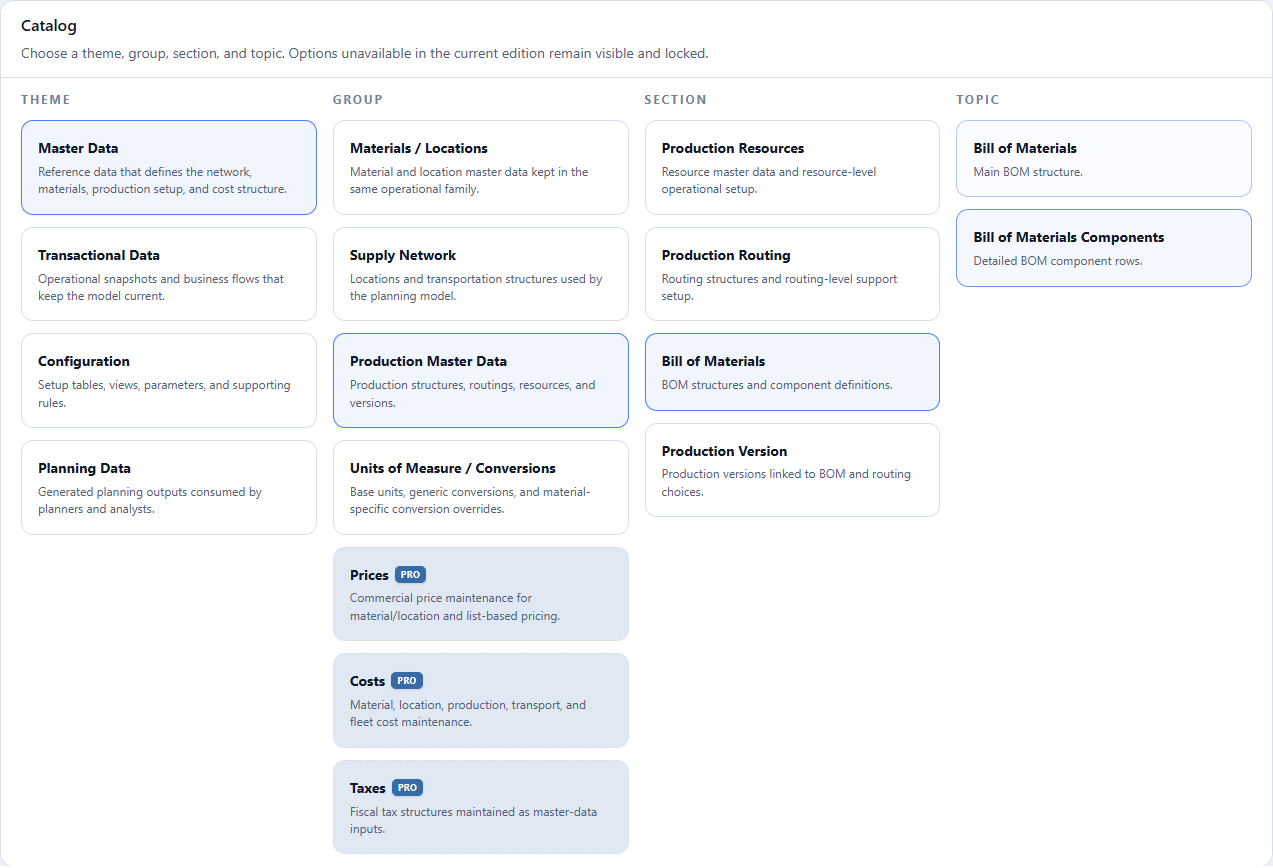
- Theme: select Master Data.
- Group: select Production Master Data.
- Section: select Bill of Materials.
- Topic: select Bill of Materials Components.
- Check Bill of Materials Components in the panel title to confirm the topic.
- Select the Import operation.
- Click Import Bill of Materials Components and choose
06-bill-of-materials-components.xlsx. Import starts after file selection; check the response before continuing.
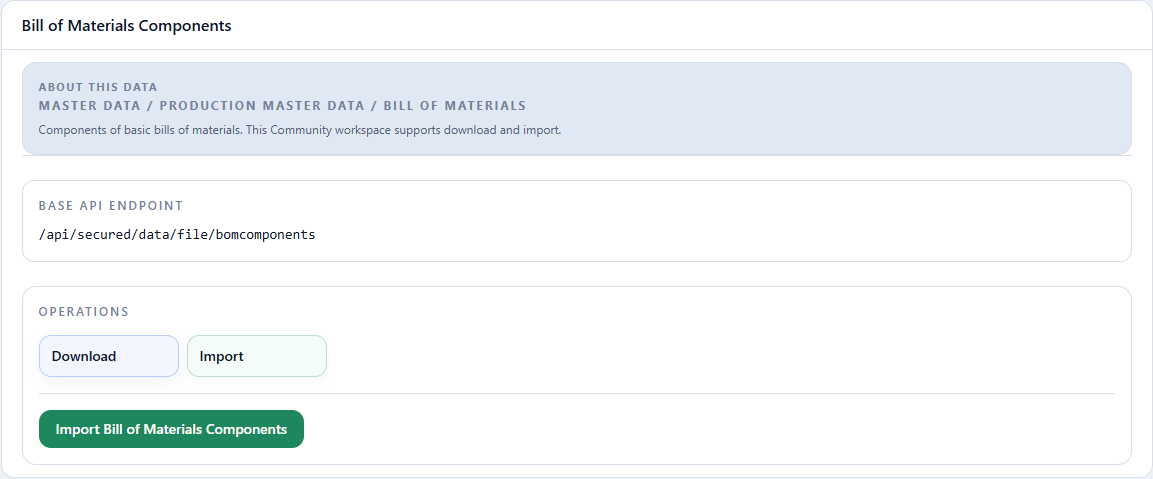
Read-only excerpt of the original export: sheet Data, 34 data rows; first 5 shown below. Headers and values are preserved. This webpage table does not alter the XLSX.
| Bill of Materials Id | Component Material Id | Component Material Quantity Unit of Measure Id | Component Material Quantity |
|---|---|---|---|
| LT_FABRICA_LESTE_BOBINA_BRANCO_75 | MP_CELULOSE | TON | 1.05 |
| LT_FABRICA_LESTE_BOBINA_BRANCO_90 | MP_CELULOSE | TON | 1.05 |
| LT_FABRICA_LESTE_BOBINA_SANITARIO | MP_CELULOSE | TON | 1.08 |
| LT_FABRICA_LESTE_PA_BRANCO_75_A4_100 | PILHA_BRANCO_75 | TON | 1.01 |
| LT_FABRICA_LESTE_PA_BRANCO_75_A4_50 | PILHA_BRANCO_75 | TON | 1.01 |
| Field | Meaning | Tutorial value |
|---|---|---|
Bill of Materials Id |
BOM that consumes the component. | LT_FABRICA_LESTE_PA_COPIA_A4 |
Component Material Id |
Input material consumed. | PILHA_BRANCO_75 |
Component Material Quantity Unit of Measure Id |
Consumption unit. | TON |
Component Material Quantity |
Consumption per BOM output quantity. | 1.01 |
The chain uses 1.05 TON of pulp per TON of roll, 1.02 TON of roll per TON of skid, and 1.01 TON of skid per TON of finished good. These values represent technical consumption and physical loss; they are not costs.
Checkpoint: the Download should return the component tied to the exact BOM ID.
7. Link the routing and bill of materials
Action required
Import all 34 versions last. If an import fails, stop and reconcile the material, location, routing, and bill-of-materials IDs.
Master Data > Production Master Data > Production Version > Production Version.
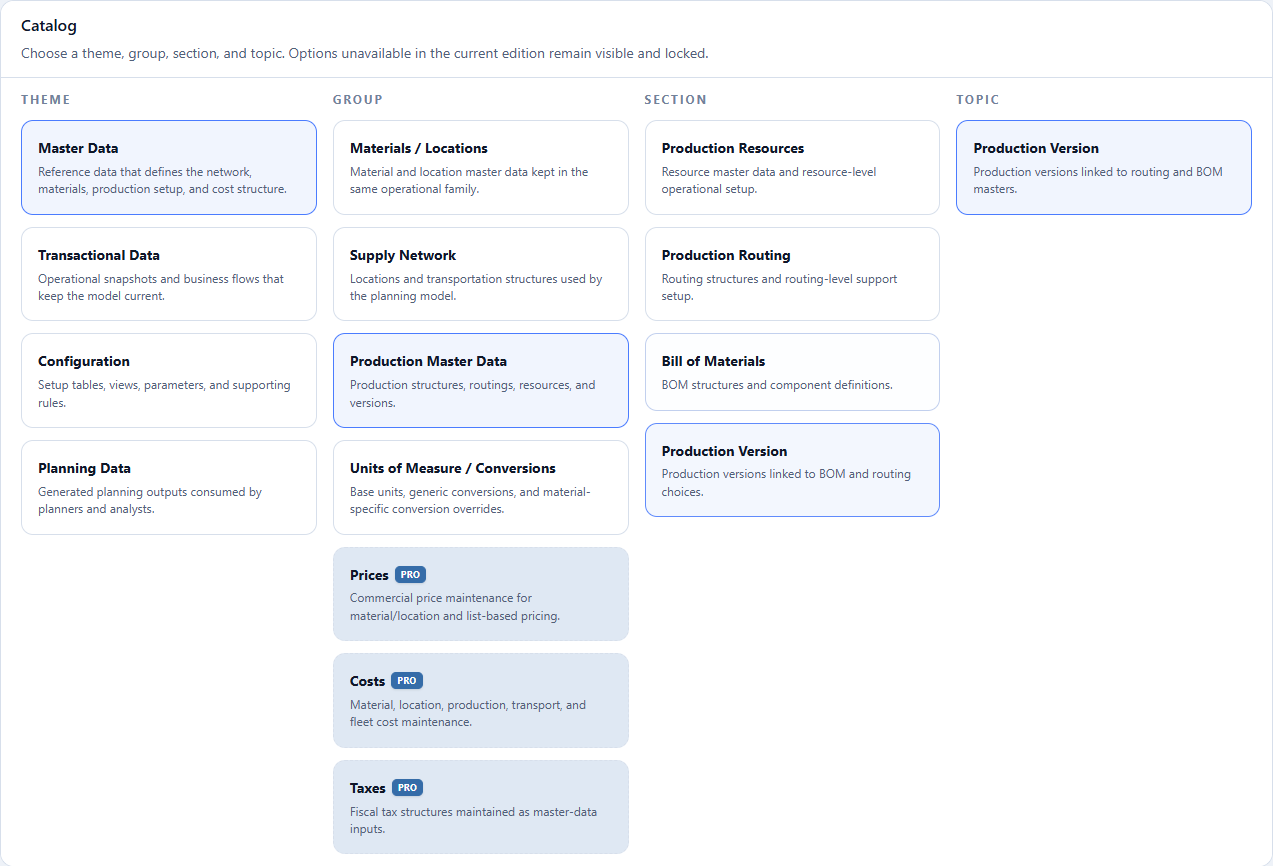
- Theme: select Master Data.
- Group: select Production Master Data.
- Section: select Production Version.
- Topic: select Production Version.
- Check Production Version in the panel title to confirm the topic.
- Select the Import operation.
- Click Import Production Version and choose
07-production-version.xlsx. Import starts after file selection; check the response before continuing.
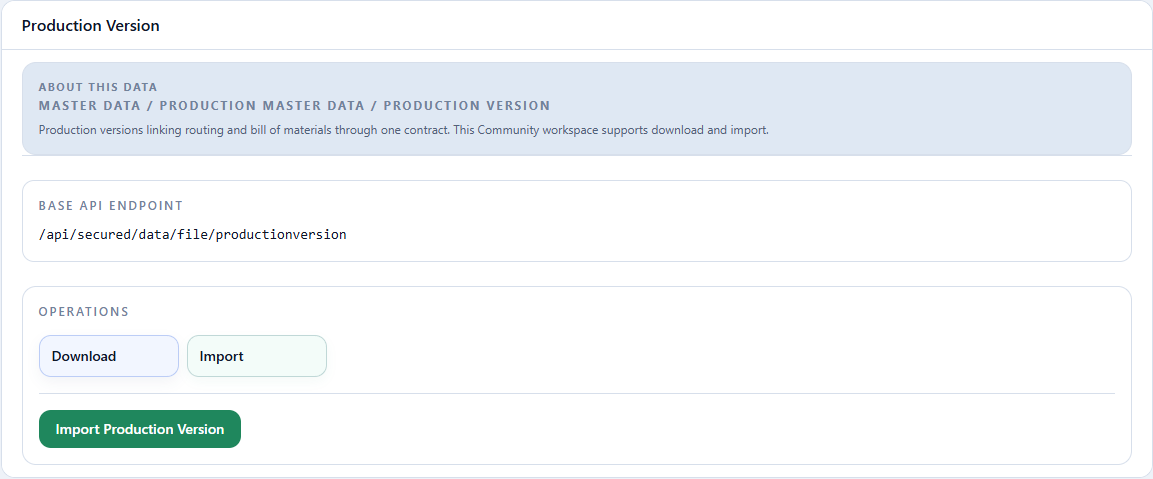
Read-only excerpt of the original export: sheet Data, 34 data rows; first 5 shown below. Headers and values are preserved. This webpage table does not alter the XLSX.
| Id | Location Id | Priority | Output Material Id | Routing Id | Bill of Materials Id | Active |
|---|---|---|---|---|---|---|
| VP_TUTORIAL_031 | FABRICA_LESTE | 1 | PA_COPIA_A4 | ROTEIRO_FABRICA_LESTE_PA_COPIA_A4 | LT_FABRICA_LESTE_PA_COPIA_A4 | TRUE |
| VP_TUTORIAL_030 | FABRICA_SUL | 1 | PILHA_SANITARIO_TRIPLO | ROTEIRO_FABRICA_SUL_PILHA_SANITARIO_TRIPLO | LT_FABRICA_SUL_PILHA_SANITARIO_TRIPLO | TRUE |
| VP_TUTORIAL_021 | FABRICA_SUL | 1 | PA_BRANCO_75_CARTA_100 | ROTEIRO_FABRICA_SUL_PA_BRANCO_75_CARTA_100 | LT_FABRICA_SUL_PA_BRANCO_75_CARTA_100 | TRUE |
| VP_TUTORIAL_020 | FABRICA_SUL | 1 | PA_BRANCO_75_A4_50 | ROTEIRO_FABRICA_SUL_PA_BRANCO_75_A4_50 | LT_FABRICA_SUL_PA_BRANCO_75_A4_50 | TRUE |
| VP_TUTORIAL_032 | FABRICA_LESTE | 1 | PA_PREMIUM_A4 | ROTEIRO_FABRICA_LESTE_PA_PREMIUM_A4 | LT_FABRICA_LESTE_PA_PREMIUM_A4 | TRUE |
Scroll horizontally to check every column.
| Field | Meaning | Tutorial value |
|---|---|---|
Id |
Unique production-version code. | VP_TUTORIAL_031 |
Location Id |
Plant where the version is valid. | FABRICA_LESTE |
Priority |
Preference order. | 1 |
Output Material Id |
Material produced. | PA_COPIA_A4 |
Routing Id |
Routing used by the version. | ROTEIRO_FABRICA_LESTE_PA_COPIA_A4 |
Bill of Materials Id |
BOM used by the version. | LT_FABRICA_LESTE_PA_COPIA_A4 |
Active |
Determines whether the version can be used. | true |
Output Material Id validates the output already defined by the routing
and bill of materials. It is not a separate material association.
Checkpoint: the Download must reproduce the three links — material, routing, and BOM — at the same location.
Completion criterion
Complete the chapter when all seven Downloads reproduce 10 resources, 120
availability rows, and 34 routings, operations, bills of materials,
components, and versions without reference, location, or unit errors. The
clean tutorial run confirmed positive roll, skid, PA_COPIA_A4, and
PA_PREMIUM_A4 production at both FABRICA_LESTE and FABRICA_SUL; each new
installation should repeat this proof when running the Supply Plan.
Return to Demand Plan review, or continue with the supply network.