12. Load the supply network
The network defines which locations can supply one another, with which lead time, and for which materials. It connects suppliers, plants, distribution centers, and demand points. It does not replace the production model: a lane permits a flow, but does not prove that a material was produced or purchased.
Prerequisites are the locations and materials from chapter 2 and, for the manufactured finished good, the production structure from chapter 11.
Original file and field glossary
Keep the download identical to the application export: headers, sheet names, column order, types, values and native formatting. The field tables explain the literal technical names outside the workbook. Configured descriptions and IDs are scenario data, not translations applied after download.
Tutorial flows
flowchart TB
    SE["East pulp supplier<br/><small>Supplier: source of raw material</small>"] -->|pulp| ME["East mill<br/><small>Plant: transforms materials</small>"]
    SS["South pulp supplier<br/><small>Supplier: source of raw material</small>"] -->|pulp| MS["South mill<br/><small>Plant: transforms materials</small>"]
    ME -->|eligible materials| DE["East DC<br/><small>Distribution center:<br/>receives and redistributes</small>"]
    ME -->|10 explicit finished goods| MS
    ME -->|eligible materials| DI["Inland DC<br/><small>Distribution center:<br/>receives and redistributes</small>"]
    MS -->|eligible materials| DI
    DE -->|eligible materials| C["Central / Coastal /<br/>East regions<br/><small>Demand points:<br/>aggregate customers by channel</small>"]
    DI -->|eligible materials| C
Names identify scenario locations; each subnote explains the node's role. A region represents aggregated demand and is not a physical DC. The final box summarizes six demand points: three regions with two channels each. Arrows represent transportation lanes enabled in the network version; their labels identify the materials allowed to flow through them.
Load order
| Order | File | Dataset | Depends on |
|---|---|---|---|
| 8 | 08-supply-network-version.xlsx |
Network version | — |
| 9 | 09-transportation-lanes.xlsx |
Location-to-location lanes | version and locations |
| 10 | 10-transportation-lane-materials.xlsx |
Allowed materials by lane | version, lanes, and materials |
Open the network topics
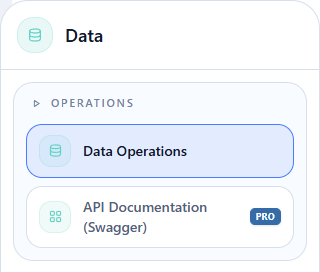
Hover over Data and click Operations > Data Operations in the flyout.
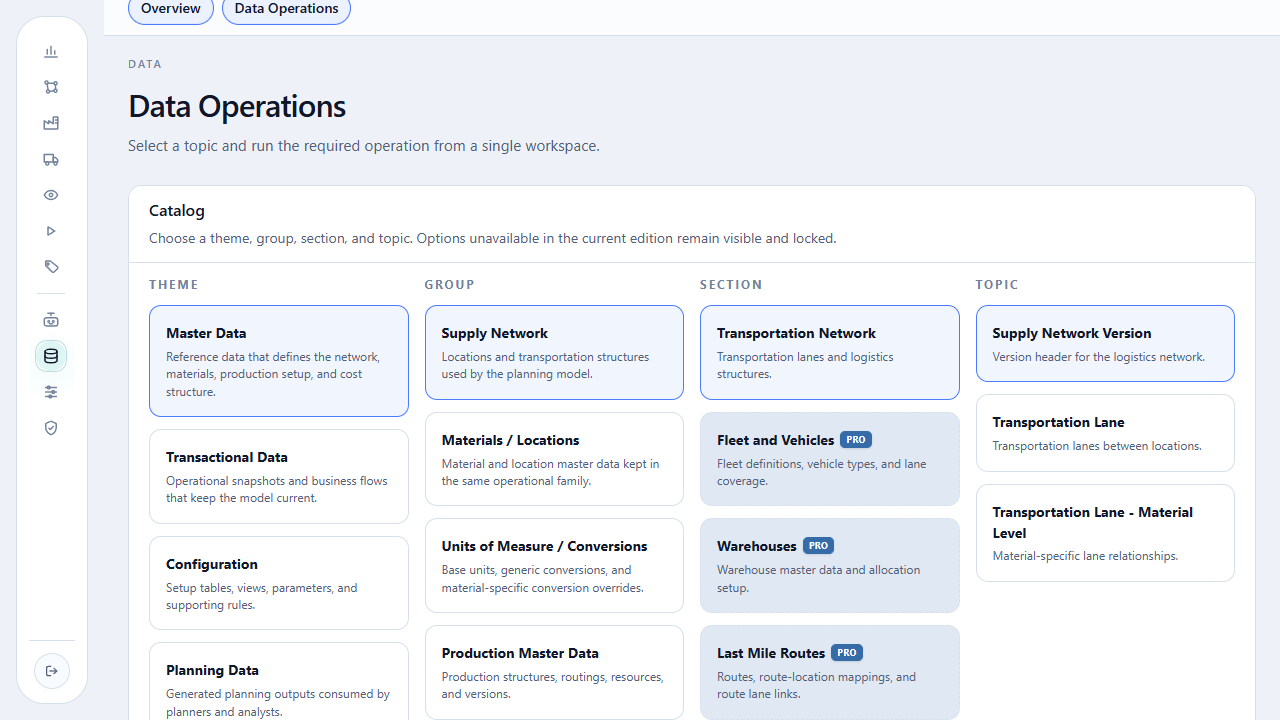
On the open page, select Master Data > Supply Network > Transportation Network. The Topic column lists the three topics in load order.
For each topic: select Download, click Download as XLSX, open the file, then return to the same topic, select Import, choose the file, and run the import.
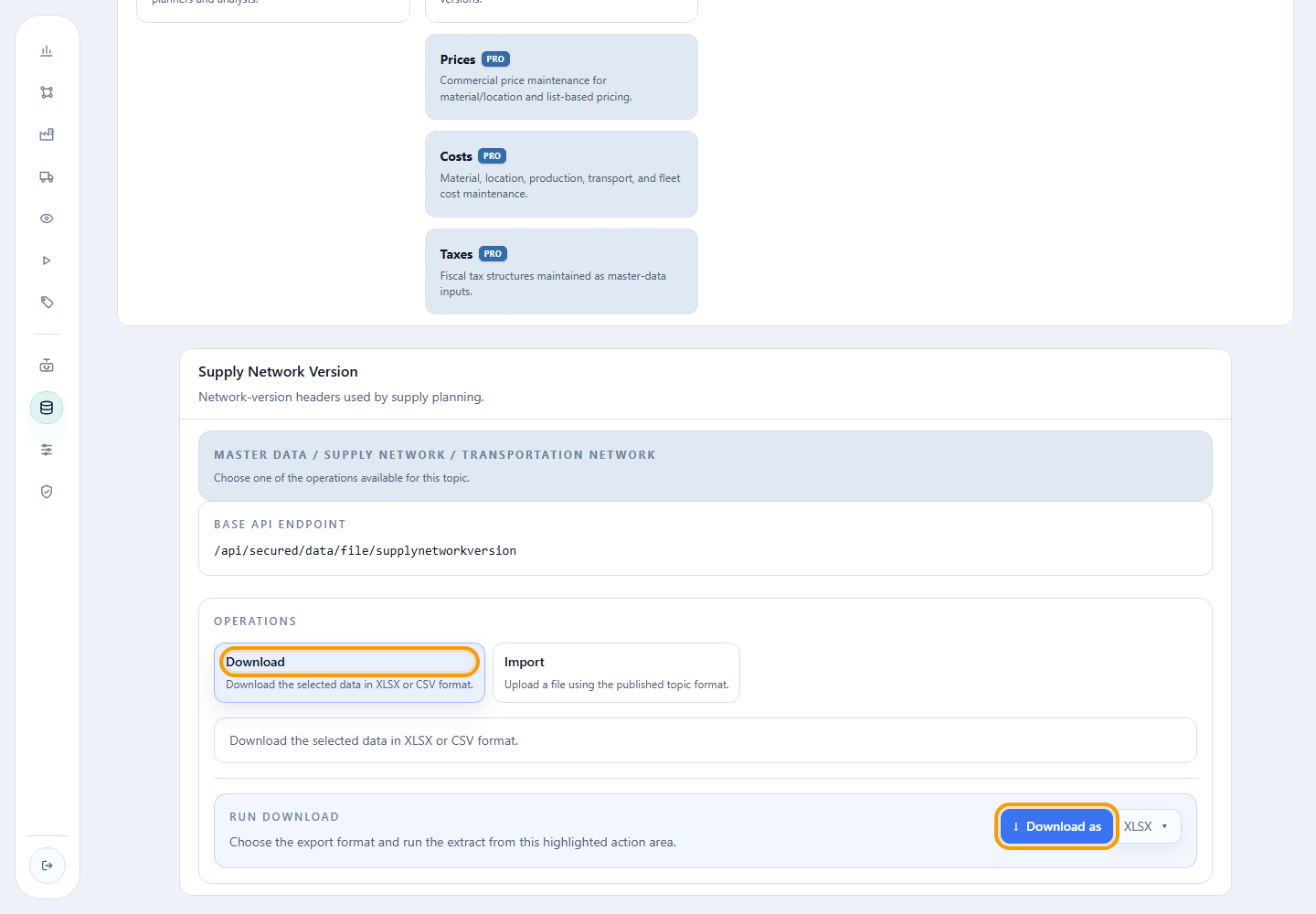
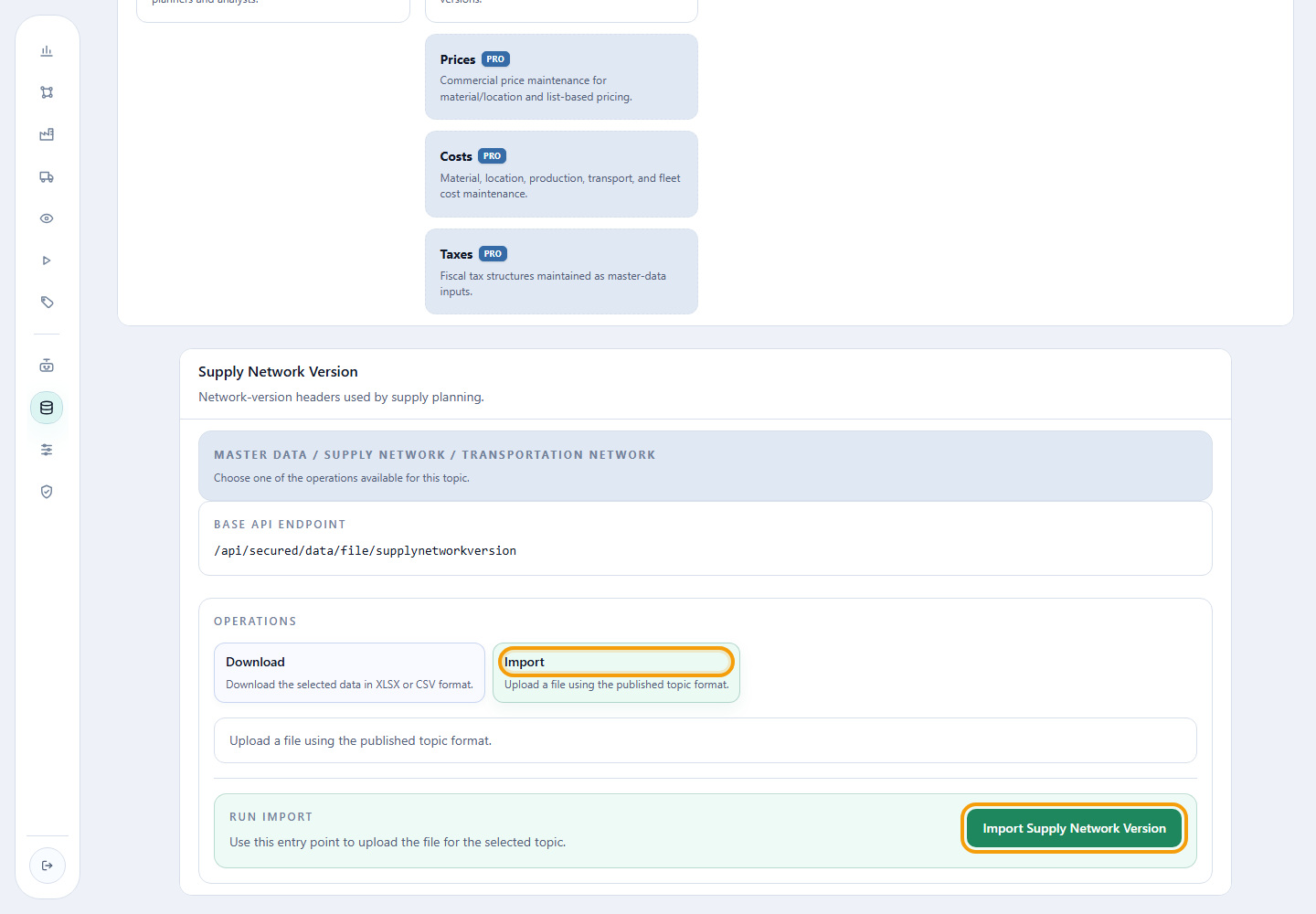
The images locate the controls in the first topic. The steps below state the exact topic for each file.
1. Create the network version
08-supply-network-version.xlsx
Action required
Download the template, open the workbook, and import the version header before loading any lane.
Master Data > Supply Network > Supply Network > Supply Network Version.
Select Import, choose 08-supply-network-version.xlsx, and click
Import Supply Network Version.
Read-only excerpt of the original export: sheet Data, 1 data rows; first 1 shown below. Headers and values are preserved. This webpage table does not alter the XLSX.
| Supply Network Version Id | Supply Network Version Description | Default Origin Location for Clients | Default Origin Location for Raw Materials | Default Origin Location for Raw Materials Lead Time Days |
|---|---|---|---|---|
| MALHA_PADRAO_V2 | Malha do tutorial — prioridade ao atendimento local |
| Field | Meaning | Tutorial value |
|---|---|---|
Supply Network Version Id |
Code that identifies and links every network record. | MALHA_PADRAO_V2 |
Supply Network Version Description |
Recognizable version name. | Tutorial local-first supply network |
Default Origin Location for Clients |
Origin used when a client has no explicit supply path. | blank |
Default Origin Location for Raw Materials |
Automatic origin for materials without explicit supply. | blank |
Default Origin Location for Raw Materials Lead Time Days |
Lead time of the default raw-material origin. | blank |
Keep the default raw-material origin blank. Before all production is modeled, setting it could make an incomplete finished good appear purchasable.
Checkpoint: a new Download should return MALHA_PADRAO_V2 with both
default origins blank.
2. Create transportation lanes
Action required
Download the template and import all 18 lanes. Use Enable Transportation
Line for All Materials = false on the two raw-material entries and the
plant-to-plant transfer; the remaining lanes use true.
Master Data > Supply Network > Supply Network > Transportation Lane.
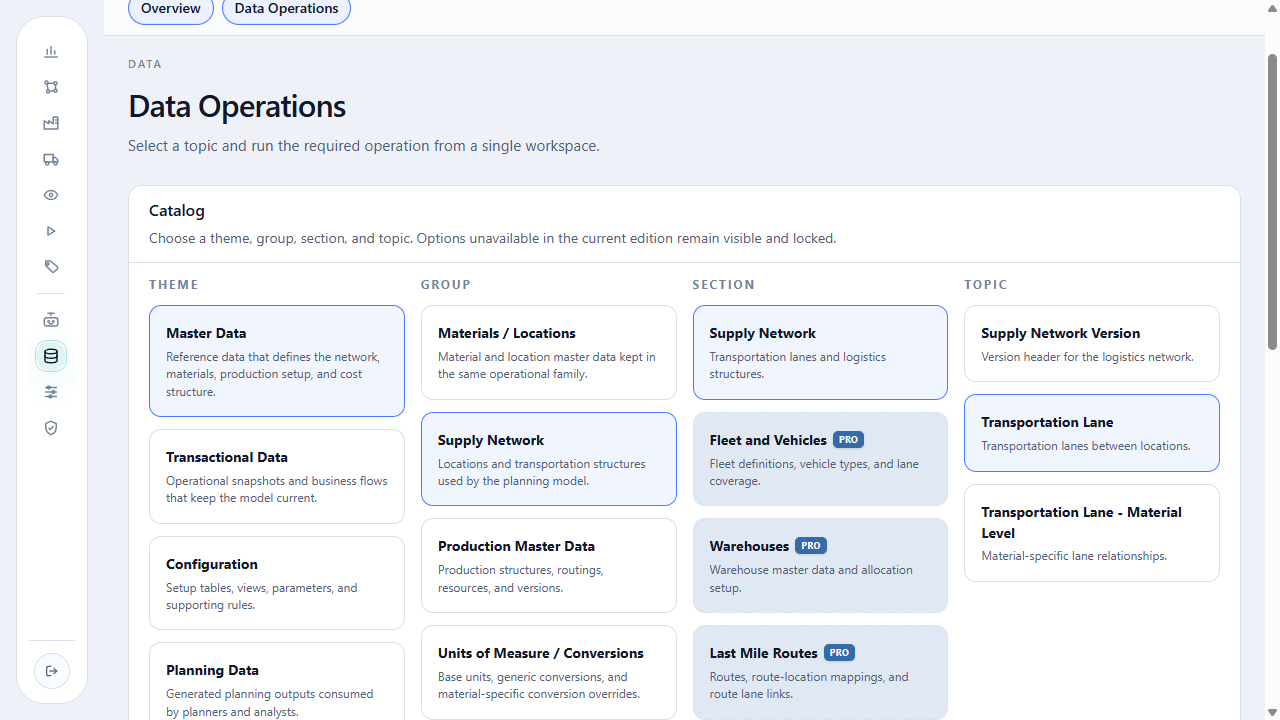
The catalog screen above shows Transportation Lane in the Topic column.
Select Import, choose 09-transportation-lanes.xlsx, and run the
import for the selected topic. The controls use the same layout shown for
Supply Network Version; confirm the topic title before loading.
Read-only excerpt of the original export: sheet Data, 18 data rows; first 5 shown below. Headers and values are preserved. This webpage table does not alter the XLSX.
| Supply Network Version Id | Origin Location Id | Destination Location Id | Priority (0 = largest priority) | Lead Time (Days) | Enable Transportation Line for Discontinued Materials (TRUE/FALSE or 1/0) | Enable Transportation Line for Materials not yet launched (TRUE/FALSE or 1/0) | Enable Transportation Line for All Materials (TRUE/FALSE or 1/0) | Multiple Minimum Transfer Lot Size UOM Id | Minimum Transfer Lot Size | Multiple Transfer | Active : TRUE/FALSE or 1/0 (Default = True if empty) |
|---|---|---|---|---|---|---|---|---|---|---|---|
| MALHA_PADRAO_V2 | FORNECEDOR_CELULOSE_LESTE | FABRICA_LESTE | 1 | 2 | FALSE | TRUE | |||||
| MALHA_PADRAO_V2 | FORNECEDOR_CELULOSE_SUL | FABRICA_SUL | 1 | 2 | FALSE | TRUE | |||||
| MALHA_PADRAO_V2 | FABRICA_LESTE | CD_LESTE | 1 | 1 | TRUE | TRUE | |||||
| MALHA_PADRAO_V2 | FABRICA_SUL | CD_INTERIOR | 1 | 60 | TRUE | TRUE | |||||
| MALHA_PADRAO_V2 | FABRICA_LESTE | CD_INTERIOR | 2 | 30 | TRUE | TRUE |
| Field | Meaning | Tutorial value |
|---|---|---|
Supply Network Version Id |
Version to which the lane belongs. | MALHA_PADRAO_V2 |
Origin Location Id |
Location that ships the material. | supplier, plant, or DC |
Destination Location Id |
Location that receives the material. | plant, DC, or region |
Priority (0 = largest priority) |
Lane preference order. | 1 or 2 |
Lead Time (Days) |
Flow time in days. | 1, 2, 30, or 60 |
Enable Transportation Line for Discontinued Materials (TRUE/FALSE or 1/0) |
Allows discontinued materials on the lane. | blank |
Enable Transportation Line for Materials not yet launched (TRUE/FALSE or 1/0) |
Allows materials that have not launched. | blank |
Enable Transportation Line for All Materials (TRUE/FALSE or 1/0) |
Allows any eligible material without an allowlist. | false when explicit permission is required; true on the other lanes |
Multiple Minimum Transfer Lot Size UOM Id |
Unit of the lot parameters. | blank |
Minimum Transfer Lot Size |
Smallest transferable lot. | blank |
Multiple Transfer |
Multiple used to form transfers. | blank |
Active : TRUE/FALSE or 1/0 (Default = True if empty) |
Determines whether the lane can be used. | true |
Checkpoint: the Download should return 18 origin-destination pairs, all
active and linked to the same version. The two supplier-to-plant lanes and the
plant-to-plant lane must keep Allow All Materials = false.
3. Enable materials by lane
10-transportation-lane-materials.xlsx
Action required
Download the template and import only the 12 authorized material-lane combinations in the file.
Master Data > Supply Network > Supply Network > Transportation Lane - Material Level.
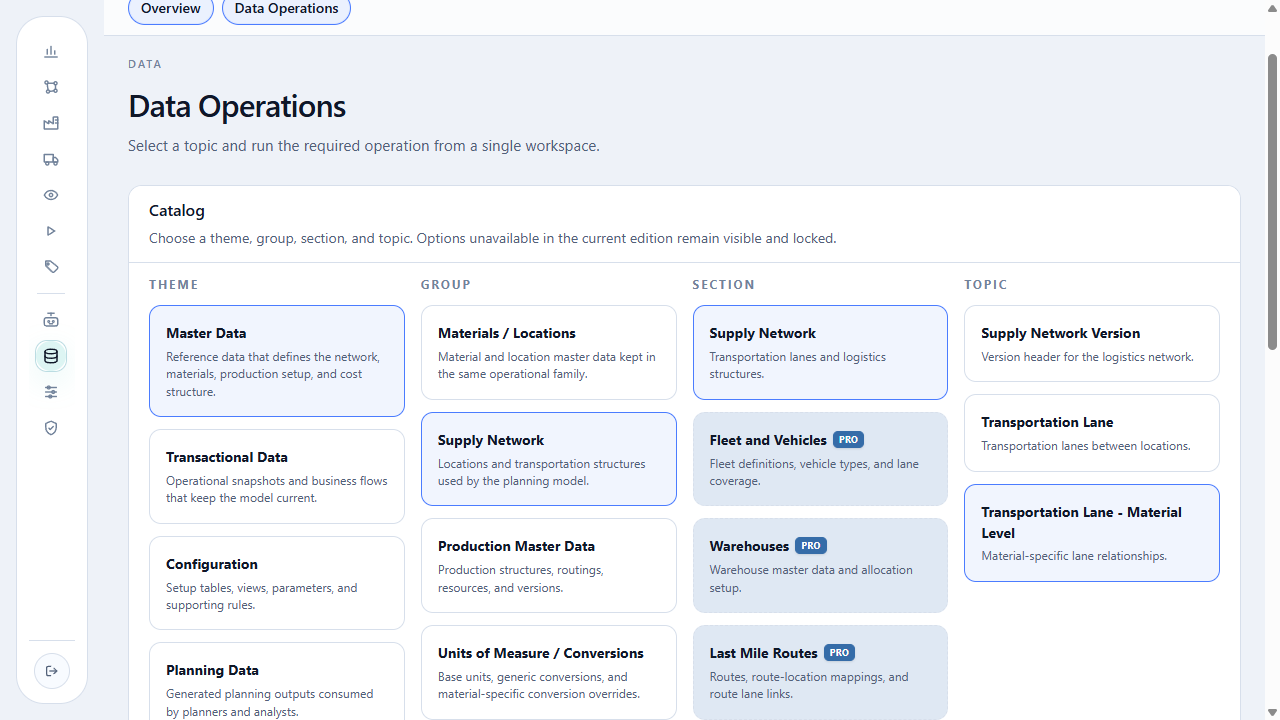
The catalog screen above shows Transportation Lane - Material Level in the Topic column.
Select Import, choose 10-transportation-lane-materials.xlsx, and run
the import for the selected topic. Confirm Transportation Lane -
Material Level in the title before loading.
Read-only excerpt of the original export: sheet Data, 12 data rows; first 5 shown below. Headers and values are preserved. This webpage table does not alter the XLSX.
| Supply Network Version Id | Origin Location Id | Destination Location Id | Material Id | Priority (0 = largest priority) | Lead Time (Days) | Multiple Minimum Transfer Lot Size UOM Id | Minimum Transfer Lot Size | Multiple Transfer | Active : TRUE/FALSE or 1/0 (Default = True if empty) |
|---|---|---|---|---|---|---|---|---|---|
| MALHA_PADRAO_V2 | FORNECEDOR_CELULOSE_LESTE | FABRICA_LESTE | MP_CELULOSE | 1 | 2 | TRUE | |||
| MALHA_PADRAO_V2 | FORNECEDOR_CELULOSE_SUL | FABRICA_SUL | MP_CELULOSE | 1 | 2 | TRUE | |||
| MALHA_PADRAO_V2 | FABRICA_LESTE | FABRICA_SUL | PA_BRANCO_75_A4_100 | 1 | 2 | TRUE | |||
| MALHA_PADRAO_V2 | FABRICA_LESTE | FABRICA_SUL | PA_BRANCO_75_A4_50 | 1 | 2 | TRUE | |||
| MALHA_PADRAO_V2 | FABRICA_LESTE | FABRICA_SUL | PA_BRANCO_75_CARTA_100 | 1 | 2 | TRUE |
| Field | Meaning | Tutorial value |
|---|---|---|
Supply Network Version Id |
Network version. | MALHA_PADRAO_V2 |
Origin Location Id |
Origin of the registered lane. | matches the lane |
Destination Location Id |
Destination of the registered lane. | matches the lane |
Material Id |
Material authorized to use the lane. | MP_CELULOSE or one of the 10 finished goods |
Priority (0 = largest priority) |
Preference for this material-lane combination. | 1 |
Lead Time (Days) |
Material-specific lead time. | matches the lane |
Multiple Minimum Transfer Lot Size UOM Id |
Unit of the lot parameters. | blank |
Minimum Transfer Lot Size |
Smallest material lot on the lane. | blank |
Multiple Transfer |
Transfer multiple. | blank |
Active : TRUE/FALSE or 1/0 (Default = True if empty) |
Determines whether the permission is active. | true |
Risk: a supplier sourcing finished goods
If a supplier-to-plant lane uses Allow All Materials = true, every
eligible material at both endpoints may flow. That can make a finished
good purchasable from the supplier. The tutorial uses false and an
explicit material list.
Checkpoint: the Download should return 12 permissions: MP_CELULOSE appears
on the two supplier-to-plant lanes, while the 10 finished goods, including
PA_COPIA_A4 and PA_PREMIUM_A4, appear on the FABRICA_LESTE → FABRICA_SUL
transfer.
Community model boundaries
The network uses lead time, priority, lot constraints, status, and material enablement. It does not represent maps, distance, fleets, freight cost, or economic network design.
Completion criterion
Complete the chapter when the three Downloads reproduce the version, 18 lanes, and 12 explicit permissions without missing references.
Return to production data, or continue with the inventory policy.