Analyze the Demand Plan
Analysis should answer whether the plan is technically complete, statistically reasonable, and operationally explainable.
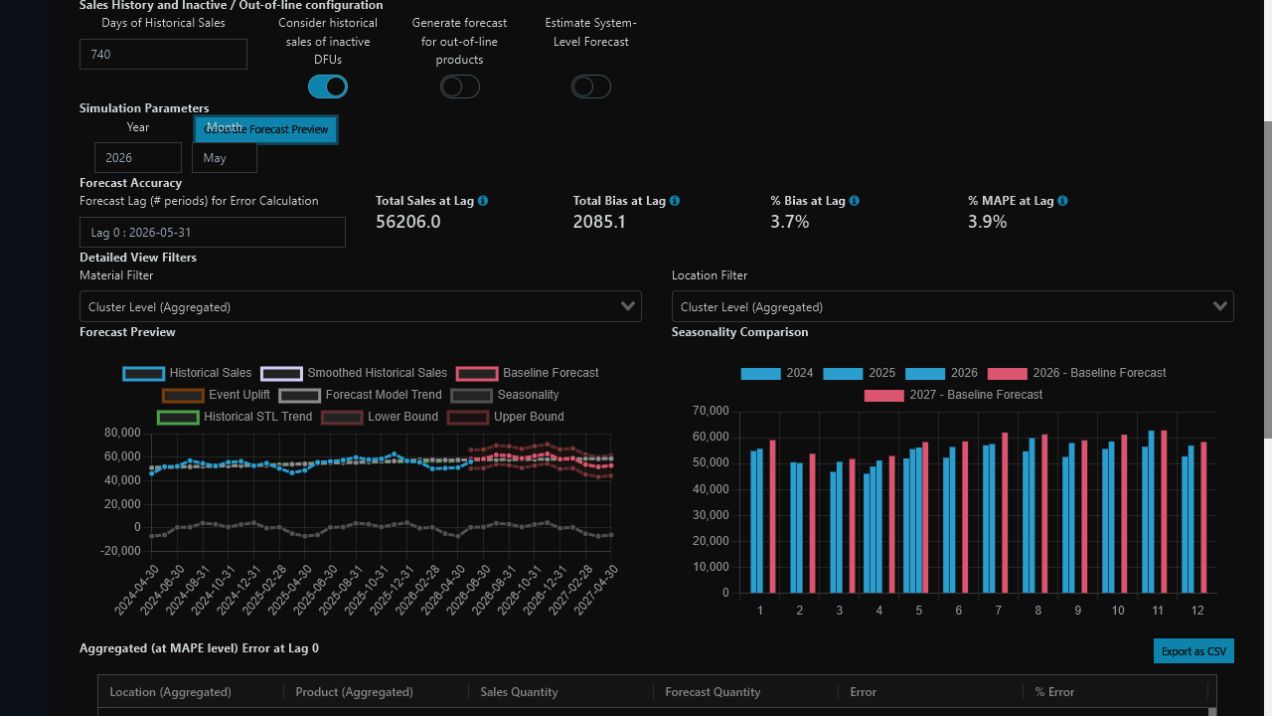
A useful preview combines aggregate metrics with the shape of the series and supports exception drill-down.
Keep the series distinct
- Original history received from the source.
- Treated history after cleaning rules.
- Statistical baseline produced by the model.
- Collaborated plan after approved adjustments.
- Final demand released to downstream consumers.
Procedure
- Select the Demand Plan and the Configured Planning View that provides the unit and visible measures.
- Start with the total, then drill into clusters and exception DFUs.
- Compare history and baseline.
- Inspect level shifts, trend, seasonality, and zero runs.
- Review bias and error by period and group.
- Separate statistical error from known future events.
- Record data issues and collaboration exceptions.
Metrics
| Metric | Question | Caution |
|---|---|---|
| Bias | Is the plan systematically above or below actuals? | Opposing errors may cancel |
| MAE | What is the average absolute error? | Not comparable across very different scales |
| WAPE | What is total absolute error relative to total volume? | Large groups dominate |
| MAPE | What is average percentage error? | Zeros and small volumes distort |
Simulation is appropriate for testing parameters. Saving simulation settings does not create an official Demand Plan; that requires the official run.
This page supports technical review of one Demand Plan. For retrospective evaluation without hindsight, use Demand Accuracy, which selects the version that was official for each sales period through Released Demand.
Manage by exception
Prioritize economically important series, structural changes, recurring bias, threshold breaches, and material collaboration adjustments.