16. Run the Supply Plan
The run combines the collaborated Demand Plan, network version, execution profile, calendar, inventory policy, initial stock, and production capacity. Check those references before submitting; a completed task with the wrong scenario is still the wrong plan.
Submit the run
Open Processes > Process Execution, then select Supply Chain Planning > Plan Generation > Execute Supply Plan.
| Field | Value |
|---|---|
| Action | Create a new Supply Plan |
| Execution profile | SP_TUTORIAL_LOCAL_FIRST_2027 |
| Supply network version | STANDARD_NETWORK_V2 |
| Reference Demand Plan | the January 2027 plan completed in chapter 9 |
| Description | Paper tutorial — January 2027 |
| Reference period | January 2027 |
| Reference Supply Plan for initial stock projection | none |
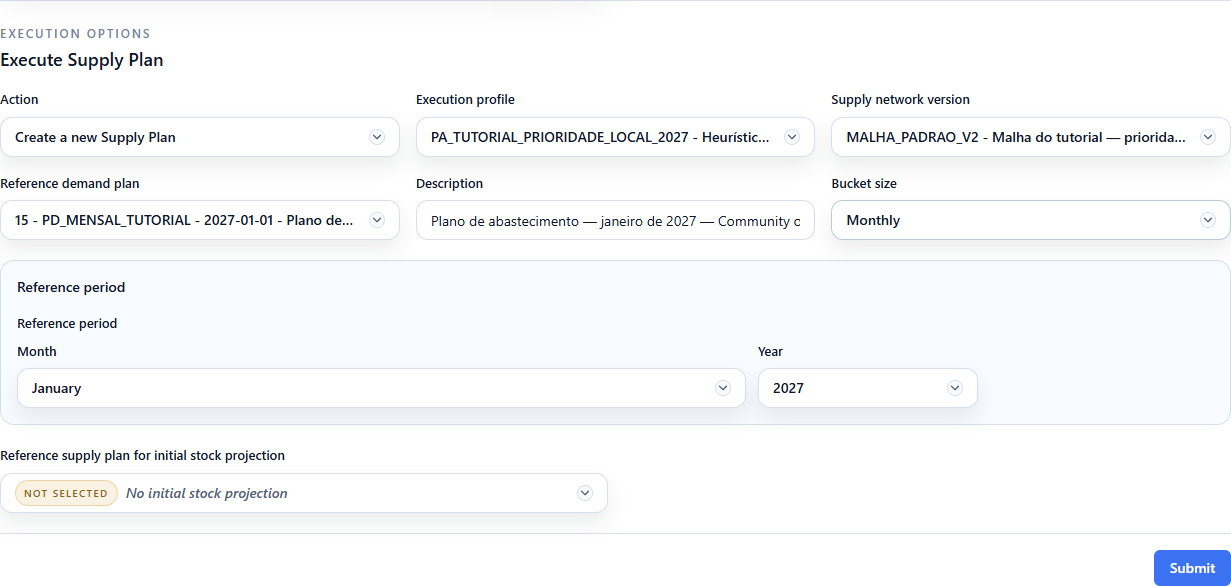
The last option does not disable the uploaded opening stock. It means that no
older Supply Plan will project the opening balance; the profile still reads the
transactional snapshot from 2027-01-01.
Click Submit once. Repeated submissions create separate plans.
Follow Process Status
Open Processes > Process Status and filter by the description or task ID.
- Running means the task is still processing.
- Completed means the result was persisted and can be opened.
- Warning requires reading the message and checking whether the expected output is complete.
- Failed means no result should be interpreted; correct the reported data or configuration inconsistency and submit a new run.

Confirm the saved plan
Open Supply Chain Planning > Supply Plans, filter by the description, and check the profile, network version, Demand Plan, calendar-derived reference, and creation time. Use the ID assigned in your environment; it need not match the screenshot.

Confirm that the plan exposes Unconstrained, Constrained, and Working series. The constrained heuristic is a feasible rule-based result, not a claim of global optimality. The unconstrained series helps expose demand and production above available capacity; Working is the series selected by the profile for operational review.
Checkpoint
- Process Status is Completed;
- one persisted plan matches the intended description and references;
- its horizon contains the twelve monthly buckets of 2027;
- Unconstrained, Constrained, and Working series are available.
Continue to 17. Open, analyze, and export the Supply Plan.
Previous: 15. Configure the Supply execution profile.